San Andreas / Trains
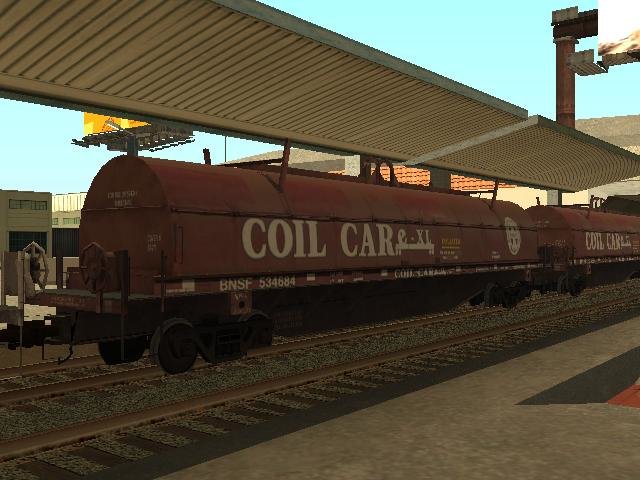
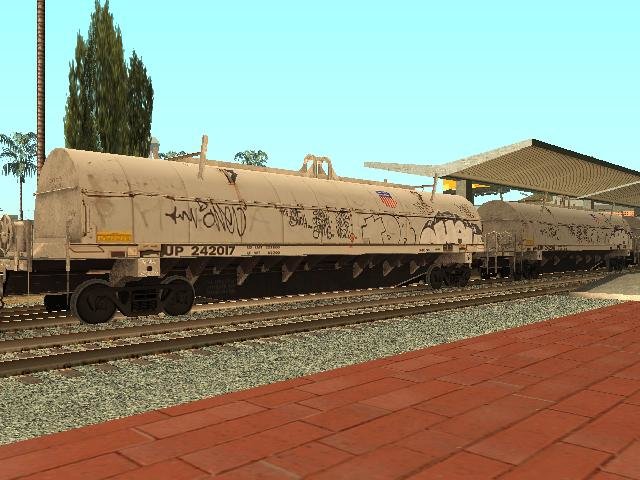
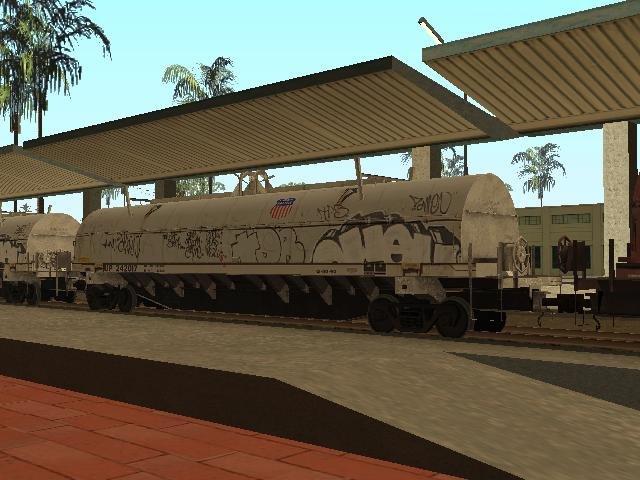
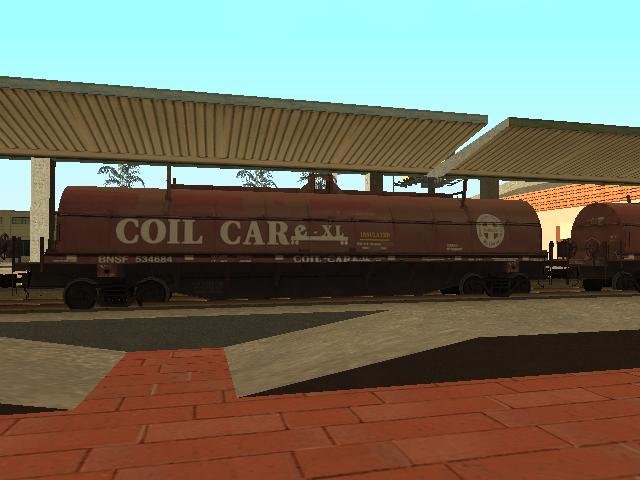
Coil Cars (Two Models BNSF and UP)
- Railworks 2 Train Simulator, Driver, Fernando33 | uploaded by Fernando33
- gtainside.com
- 04/10/2020
- 3913 Downloads
Ratings:
Please sign in first.
Favorites:
Download
1.96Mb
1.96Mb
Videos
No videos added yet.You need to be signed in to add videos to this mod.
Description
tanker car is used for transportation of liquid cargo, liquefied gases and powder materials.
The model is presented in two color options - white and red
The model may appear in a random skins (if it is installed instead of one of the standard models and if the Vehicle Remap plugin is installed
Ability to manually select one of the skins for use without a script or on an additional ID
Read and follow the installation procedure carefully for the model to work correctly in the game! To install, use IMGTool. Opening it with gta3.img (located in the 'models' folder in the game directory)
1. Using the FIND command, find and delete the freiflat.dff file and use the ADD command to insert the freiflat.dff file from this archive.
2A. Installation using the Vehicle Remap script:
Using the FIND command, find and delete the freiflat.txd file and use the ADD command to insert the freiftat.txd and reiflat1.txd files from the "txd (script)" folder.
2B. Installation with a choice of one of the skins (also these txd files for installation on additional IDs). From the "txd (manual)" folder, select the txd file according to the desired color, white (white) or red (red) and rename the selected file to freiflat.txd. Using the FIND command, find and delete the freiflat.txd file and use the ADD command to insert the freiflat.txd file with the selected skin.
You can also install this car instead of the standard “freibox” covered wagon by first renaming the files freiflat.dff, freiflat.txd and reiflat1.txd to freibox.dff freibox.txd and freibox1.txd respectively.
By default, the freibox car does not appear in railway traffic; to display it correctly, it must be registered with the SA Train Limiter utility in one of the trains.
Это все наслаждайся игрой!!!
The model is presented in two color options - white and red
The model may appear in a random skins (if it is installed instead of one of the standard models and if the Vehicle Remap plugin is installed
Ability to manually select one of the skins for use without a script or on an additional ID
Read and follow the installation procedure carefully for the model to work correctly in the game! To install, use IMGTool. Opening it with gta3.img (located in the 'models' folder in the game directory)
1. Using the FIND command, find and delete the freiflat.dff file and use the ADD command to insert the freiflat.dff file from this archive.
2A. Installation using the Vehicle Remap script:
Using the FIND command, find and delete the freiflat.txd file and use the ADD command to insert the freiftat.txd and reiflat1.txd files from the "txd (script)" folder.
2B. Installation with a choice of one of the skins (also these txd files for installation on additional IDs). From the "txd (manual)" folder, select the txd file according to the desired color, white (white) or red (red) and rename the selected file to freiflat.txd. Using the FIND command, find and delete the freiflat.txd file and use the ADD command to insert the freiflat.txd file with the selected skin.
You can also install this car instead of the standard “freibox” covered wagon by first renaming the files freiflat.dff, freiflat.txd and reiflat1.txd to freibox.dff freibox.txd and freibox1.txd respectively.
By default, the freibox car does not appear in railway traffic; to display it correctly, it must be registered with the SA Train Limiter utility in one of the trains.
Это все наслаждайся игрой!!!
Comments
There are 35 comments posted yet.


04/15/2020 16:47
@Khair eddine
It maybe one solution only. Check handly working of the Algorithm with each other script.
But firstly you must check the Algorithm in your clear game. Clear game and:
- asi loader (for loading CLEO)
- CLEO library (v4)
- script Algorithm v5.1 (or v5)
- any limit adjuster for objects of the Algorithm
- added objects in gta3.img archive
Quote | Reply | (1)
@Khair eddine
It maybe one solution only. Check handly working of the Algorithm with each other script.
But firstly you must check the Algorithm in your clear game. Clear game and:
- asi loader (for loading CLEO)
- CLEO library (v4)
- script Algorithm v5.1 (or v5)
- any limit adjuster for objects of the Algorithm
- added objects in gta3.img archive
Quote | Reply | (1)

04/15/2020 16:47
@Khair eddine your game can to has other problem because the (Algorithm 5.1) not has problem in my game also I use the script reinstall your game and see the solution test your scripts without (Algorithm 5.1) in your game and after that see the mistake in your scripts :) ;)
Quote | Reply | (1)
@Khair eddine your game can to has other problem because the (Algorithm 5.1) not has problem in my game also I use the script reinstall your game and see the solution test your scripts without (Algorithm 5.1) in your game and after that see the mistake in your scripts :) ;)
Quote | Reply | (1)

04/15/2020 12:25
@SergeDV I don't understand what talk the boy I don't not see problem in the Script I don't not see problem in the Script ( Algorithm 5.1) I use the Script in my game always the script not has problem never for me also and in your game not has problem I don't know why you're losing time for him the boy does not understan you :) :)
Quote | Reply | (1)
@SergeDV I don't understand what talk the boy I don't not see problem in the Script I don't not see problem in the Script ( Algorithm 5.1) I use the Script in my game always the script not has problem never for me also and in your game not has problem I don't know why you're losing time for him the boy does not understan you :) :)
Quote | Reply | (1)
04/15/2020 08:52
@Khair eddine
I tell you I haven't game crashes because of added Algorithm.
Den_spb (author of the Algorithm) made fine CLEO scripts. I used Algorithm (v5) 5 years ago and I had lags only when trains are spawned in the game. No crashes.
v5.1 was published in the end of 2015. Since I haven't problems with this script. Also I use Mod Loader, where to add different cleo scripts, new models of vehicles and objects.
For example a week ago I tested speeds/acceleration of the script. I had travelling through the State of SA without crashes in some hours. A video (3600 kmph)
https://drive.google.com/file/d/1XnOxZUY_kWodJ47AhqN_oEId8aIawgx4/view
Check the cleo script in the clear game but I'm sure the game crashes because of another script or conflict of the Algorithm with other scripts.
Quote | Reply | (1)
@Khair eddine
I tell you I haven't game crashes because of added Algorithm.
Den_spb (author of the Algorithm) made fine CLEO scripts. I used Algorithm (v5) 5 years ago and I had lags only when trains are spawned in the game. No crashes.
v5.1 was published in the end of 2015. Since I haven't problems with this script. Also I use Mod Loader, where to add different cleo scripts, new models of vehicles and objects.
For example a week ago I tested speeds/acceleration of the script. I had travelling through the State of SA without crashes in some hours. A video (3600 kmph)
https://drive.google.com/file/d/1XnOxZUY_kWodJ47AhqN_oEId8aIawgx4/view
Check the cleo script in the clear game but I'm sure the game crashes because of another script or conflict of the Algorithm with other scripts.
Quote | Reply | (1)
04/15/2020 05:52
@SergeDV Thank you so much. And your game is crashing with 90% from new train algorithm.Because of the new train models.It's like me, and specially in Specific places like east los santos and unity station.I don't know why, and also i don't know how to contact the original author of this script???
Maybe he will fix it.
Quote | Reply | (0)
@SergeDV Thank you so much. And your game is crashing with 90% from new train algorithm.Because of the new train models.It's like me, and specially in Specific places like east los santos and unity station.I don't know why, and also i don't know how to contact the original author of this script???
Maybe he will fix it.
Quote | Reply | (0)
04/14/2020 10:10
@Khair eddine
What do you mean? Algorithm 5.1 or Vehicle Remap?
I have many different mods in my game, I watch game crashes sometimes, but I didn't watch crashes after using Algorithm.
About Vehicle Remap. Usually I don't use the plugin. As I tell I watch crashes but I don't know It happens because the plugin or no. I don't check it in the clear game.
If you need author of Vehicle Remap:
kenking (Крикунов Евгений) / E-mail: [email protected]
But I don't know he is active since 2016
Quote | Reply | (1)
@Khair eddine
What do you mean? Algorithm 5.1 or Vehicle Remap?
I have many different mods in my game, I watch game crashes sometimes, but I didn't watch crashes after using Algorithm.
About Vehicle Remap. Usually I don't use the plugin. As I tell I watch crashes but I don't know It happens because the plugin or no. I don't check it in the clear game.
If you need author of Vehicle Remap:
kenking (Крикунов Евгений) / E-mail: [email protected]
But I don't know he is active since 2016
Quote | Reply | (1)
04/13/2020 10:30
@Fernando33
Driver had written
"Модель может появляться в случайном из скинов (если она установлена вместо одной из стандартных моделей и при наличии установленного плагина Vehicle Remap"
For standard IDs vehicles only: freiflat (ID 569), freibox (ID 590) or another ID (400-611). Read #2A of installation in a ReadMe file.
Driver used Veh_Remap for freiflat (ID 569), not for a car in a new ID.
Quote | Reply | (0)
@Fernando33
Driver had written
"Модель может появляться в случайном из скинов (если она установлена вместо одной из стандартных моделей и при наличии установленного плагина Vehicle Remap"
For standard IDs vehicles only: freiflat (ID 569), freibox (ID 590) or another ID (400-611). Read #2A of installation in a ReadMe file.
Driver used Veh_Remap for freiflat (ID 569), not for a car in a new ID.
Quote | Reply | (0)
04/13/2020 10:05
@Fernando33
Veh_Remap works for painjobs (liveries) of standard IDs vehicles only - files *1.txd,*2.txd,*3.txd,*4.txd,*5.txd
Author had written about his plugin works with standard IDs in 2016
So game uses *.txd without *1.txd,*2.txd,*3.txd... files for vehicles in new IDs.
Ofcourse train models works normal in new IDs
Quote | Reply | (0)
@Fernando33
Veh_Remap works for painjobs (liveries) of standard IDs vehicles only - files *1.txd,*2.txd,*3.txd,*4.txd,*5.txd
Author had written about his plugin works with standard IDs in 2016
So game uses *.txd without *1.txd,*2.txd,*3.txd... files for vehicles in new IDs.
Ofcourse train models works normal in new IDs
Quote | Reply | (0)
04/13/2020 09:28
@Khair eddine
Vehicle Remap asi plugin doesn't work with models on new IDs.
Standard IDs (400-611) only
Example my car in ID 495 and ID 612 (613, 614 or 795)
https://i.imgur.com/0CAIMyD.jpg
So you can use standard IDs only or add 2 wagons with 2 different liveries in 2 new IDs
Quote | Reply | (1)
@Khair eddine
Vehicle Remap asi plugin doesn't work with models on new IDs.
Standard IDs (400-611) only
Example my car in ID 495 and ID 612 (613, 614 or 795)
https://i.imgur.com/0CAIMyD.jpg
So you can use standard IDs only or add 2 wagons with 2 different liveries in 2 new IDs
Quote | Reply | (1)
