Hi, I present you a tool. That is made by me & friend. This tool is made to add new vehicles without any coding. (YES, Add a new vehicle instead of replacing)
Before you run the tool, I assist you to go to "http://www.gtaforums.com/index.php?showtopic=420911" & follow the steps ( for those who already done these steps, skip it)
If you do not complete these steps your game & the tool will probably cause errors.
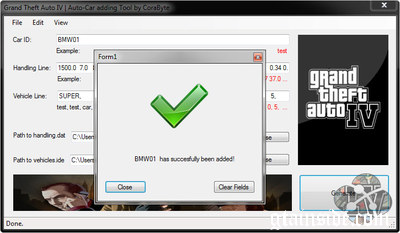
When finishing the steps you can run the tool, First we need to set the paths to handling.dat & newveh.ide
Example:
Paths to handling should be "Game Directory/Common/data/newhandling.dat"
Paths to Vehicule should be "Game Directory/Common/data/newveh.ide"
Then you need to add a "car id" in my case it's a BMW01 (Make sure there are no spaces between them so no errors will come up!)
The second line is handling. In the blank field u paste your handling of your custom vehicle. In my case it's:
BMW01 1500.0 7.0 85 0.0 -0.06 -0.18 0.0 5 0.23 1.0 160.0 0.34 0.65 0.7 35.0... (Copy all the numbers after it!)
As we see there is an name before the numbers, make sure you haven't copied them into the textfield. This will be automaticly done by the tool!
The third line is ment for vehicle.ide. This is a whole diffrent story, We removed some parts of the line that you are used to.
This is how the vehicle.ide line looks like (in my case):
"infernus, infernus, car, INFERNUS, BANSHEE, VEH@LOW, VEH@LOW_CONV, 10, 999, 0.2950, 0.2950, 0, 5, 1.0 ,0, ext_conv+ext_strong"
Because we have to replace all "infurnus" & "INFURNUS" to "bmw01" & "BMW01" We have made this easyer to you, and could cause less errors. Instead of pasting this line into the textfield.
We're going to cut a piece out of it.
BANSHEE, VEH@LOW, VEH@LOW_CONV, 10, 999, 0.2950, 0.2950, 0, 5, 1.0 ,0, ext_conv+ext_strong"
The line above is how it should be pasted.
Press generate and it should be done without any errors!
Notice: You still need to add the carcols lines into carcols.dat & Add the models into newveh.img
Make sure your carcols line uses the name of "car id". And that your models are the same name as your "car id"
Have fun!
To be done in next common versions
- Auto Installing, you will no more need the tutrail to get the tool to work.
- Carcolors.dat Adder
- Config.ini will be added
- Able to view the tutorial at the tool & See frequently asked questions.
- Logs
....
Credits (Tool)
Max98 aka MaXiMum
Coladopje aka Dopx





![2021 BMW M4 Convertible (G83) [ADD-ON/FiveM/ Animated Roof]](/downloads/picr/2024-04/thbs_1713902230_Screenshot_5.jpg)












 Loading...


