GTA IV Modding Tutorials 1. Making GTA IV moddable
2. Installing text file mods
3. Installing texture mods
4. Installing vehicle mods
1. Making GTA IV moddable:Unfortunately, at the beginning there is no way to modify GTA IV files, because the game is in "read-only" mode. In order to be able to install mods, you need to install
Xlive Less (supports v1.0.7.0!) (DOWNLOAD)
Installation of Xlive less:
a) unpack the file xlive.dll into the game folder (don't forget to remove the asi loader if there is one)
b) optional: In order to turn on debug logging, unpack the file xlive_d.dll into the game folder and rename it to xlive.dll
c) Start the game
2. Installing text file mods:
Lots of information of GTA IV are stored in text files. This is a overview of the most important ones: - carcols.dat - specifies colors of cars
- cargrp.dat - specifies groups of cars and peds. Only police officers are driving police cars, for example
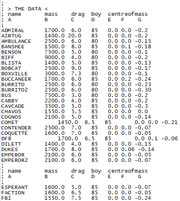
- handling.dat - this files provides some information about the handling of cars (z.B. weight, horsepower, etc)
- timecyc.dat - data of the weather conditions
- vehicles.ide - determines where and how often specific cars appear
- visualsettings.dat - contains information about visual effects like rain
- WeaponInfo.xml - data of weapons (ammunation, fire rate, etc)
Most of these text file mods have to be installed by replacing the existing files. But don't forget to make your GTA IV moddable at first ! (tutorial: see above) |
 |
3. Installing texture mods:Allmost all objects in-game are using textures. Modifications can be released in two different ways: Some texture mods are released as .wtd and .wdr files, which are file archives GTA IV uses. The other way is to publish mods by releasing the textures itself as PNG files.
In both cases you need a tool which is able to open and edit GTA IV archives. At the moment, there are two programs available:
4. Installing vehicle mods:We have a
separate tutorial which explains you the installation of vehice mods.
Click here.
![2005 Ford GT [Addon|Template|Tuning]](/downloads/picr/2025-06/1749157518_54540824662_ef174556c5_b.jpg)