Vice City / Skins
Tony Montana's outfit for Tommy Vercetty
- the jedi of racing | uploaded by the jedi of racing
- gtainside.com/user/the%20je...
- 12/15/2024
- 4756 Downloads
Ratings:
Please sign in first.
Favorites:
Videos
No videos added yet.You need to be signed in to add videos to this mod.
Description
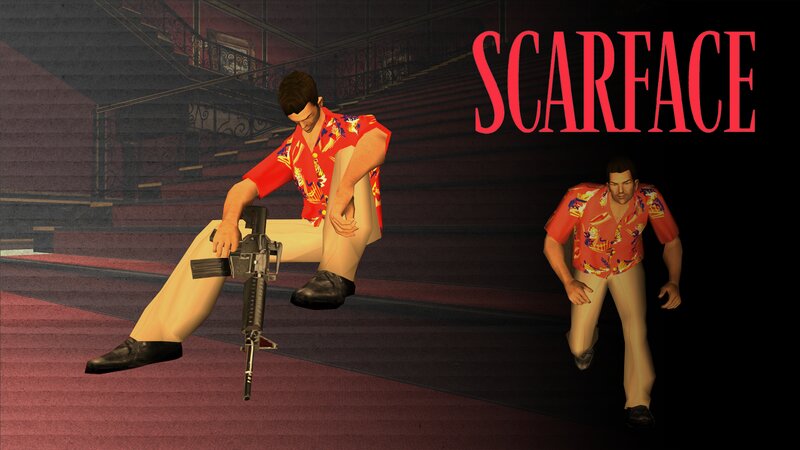
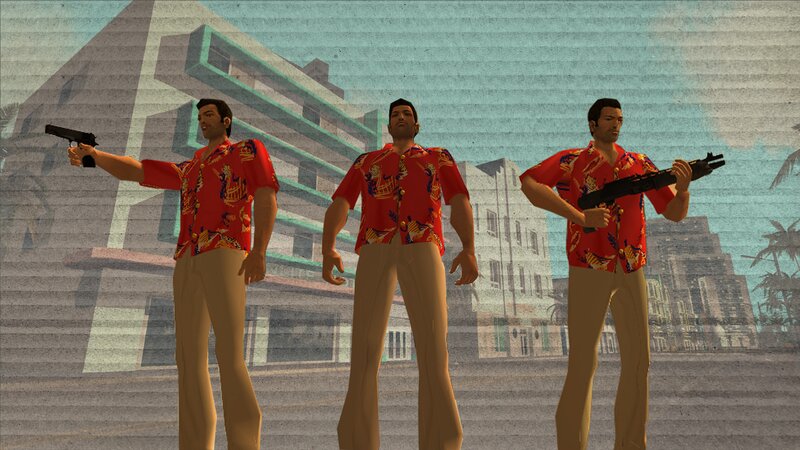
Say hello to my little friend! Today, I’m excited to present to you a brand new skin inspired by one of the most iconic movies of all time, Scarface, starring the legendary Al Pacino as Tony Montana. This skin is a tribute to the unforgettable moment when Tony Montana, clad in his infamous red Hawaiian shirt, takes down a Colombian drug dealer with a chainsaw—one of the most intense scenes in cinematic history.
-For this skin, I took great care in recreating the red Hawaiian shirt that Tony wore during that pivotal scene. I painstakingly crafted the shirt from scratch to ensure it closely resembles the one seen in the movie, capturing all the details and textures that make it stand out. The vibrant, tropical pattern is designed to be as accurate as possible, so you can fully immerse yourself in the look of this legendary character.
-To complete the outfit, I’ve also added a pair of beige pants, matching the exact style Tony wore in that moment. These pants complement the shirt perfectly, staying true to the character’s overall look. I paid close attention to the fit and color, ensuring it reflects the laid-back yet deadly persona that Tony exudes throughout the film.
-One detail I noticed in many other fan-made skins was the inclusion of accessories like the necklace and the watch that Tommy Vercetti wears. However, in order to make this skin even more authentic to Scarface, I made the decision to remove these items. Tony Montana’s character doesn’t wear any jewelry during this memorable scene, and I wanted to ensure the outfit stays true to the original appearance, with nothing extraneous to distract from the iconic look.
Installation: To install, move the files from the archive to the models\gta3.img folder or add the files to your modloader folder.
Enjoy!
-For this skin, I took great care in recreating the red Hawaiian shirt that Tony wore during that pivotal scene. I painstakingly crafted the shirt from scratch to ensure it closely resembles the one seen in the movie, capturing all the details and textures that make it stand out. The vibrant, tropical pattern is designed to be as accurate as possible, so you can fully immerse yourself in the look of this legendary character.
-To complete the outfit, I’ve also added a pair of beige pants, matching the exact style Tony wore in that moment. These pants complement the shirt perfectly, staying true to the character’s overall look. I paid close attention to the fit and color, ensuring it reflects the laid-back yet deadly persona that Tony exudes throughout the film.
-One detail I noticed in many other fan-made skins was the inclusion of accessories like the necklace and the watch that Tommy Vercetti wears. However, in order to make this skin even more authentic to Scarface, I made the decision to remove these items. Tony Montana’s character doesn’t wear any jewelry during this memorable scene, and I wanted to ensure the outfit stays true to the original appearance, with nothing extraneous to distract from the iconic look.
Installation: To install, move the files from the archive to the models\gta3.img folder or add the files to your modloader folder.
Enjoy!
Comments
There are 7 comments posted yet.