San Andreas / Trains
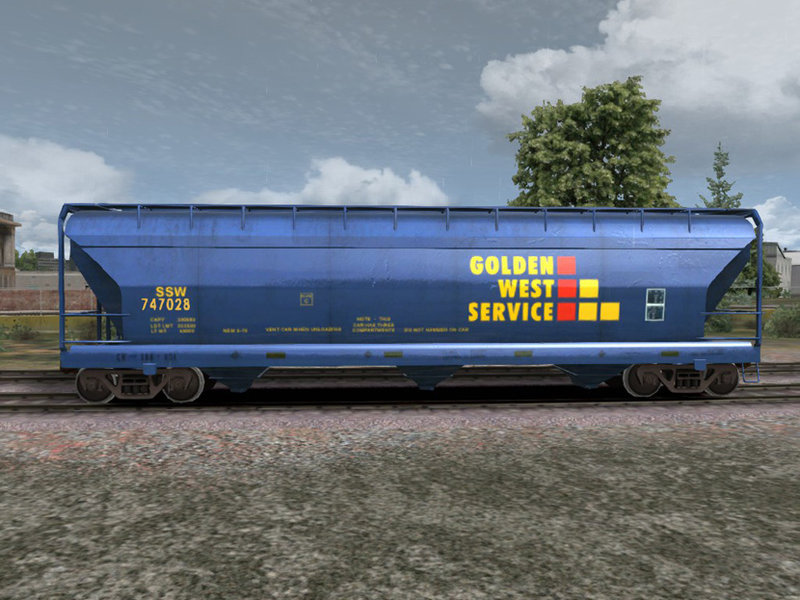
GWS Covered Hopper
- Railworks 2 Train Simulator, Driver, Fernando33 | uploaded by Fernando33
- 01/31/2021
- 3722 Downloads
Ratings:
Please sign in first.
Favorites:
Videos
No videos added yet.You need to be signed in to add videos to this mod.
Description
This model is a Golden West Service reskin of the default Kuju ACF Covered Hopper by Fernando Flordun. It normally carries soybeans or corn products.
This package is released as freeware. You can do whatever you wish with it EXCEPT make money with its use.
This package is released as freeware. You can do whatever you wish with it EXCEPT make money with its use.
Comments
There are 24 comments posted yet.

02/02/2021 13:33
@SergeDV Top-LOD Polycounts
Engine 100,000
Passenger Carriage 40,000
Freight Wagon 20,000*
Freight Wagons differ significantly in complexity. The modeller’s common sense and discretion are required to produce a consistent level of detail throughout the freight rolling stock. If you require 30,000 polygons for a complex tanker wagon for example, then try to keep a simple flatbed wagon under 15,000 polys to compensate. As a main guideline, try to not to exceed 20,000 triangles. Lower counts are fine as long as the quality bar is met. Over-budget freight wagons will require more aggressive LOD’ing. Freight should be included in the polycount. also Engines are the stars of the game and therefore have a larger texture budget than the other rolling stock. Several 32-bit 1024x1024 pixels textures can be used, the alpha channel representing the specular map. Additionally, several 24-bit normal maps of the same size are used on top of these. Together with an environment map (defined by the game code), they form the main textures of an engine model (minus its bogies, wheels and windows. :)
Quote | Reply | (1)
@SergeDV Top-LOD Polycounts
Engine 100,000
Passenger Carriage 40,000
Freight Wagon 20,000*
Freight Wagons differ significantly in complexity. The modeller’s common sense and discretion are required to produce a consistent level of detail throughout the freight rolling stock. If you require 30,000 polygons for a complex tanker wagon for example, then try to keep a simple flatbed wagon under 15,000 polys to compensate. As a main guideline, try to not to exceed 20,000 triangles. Lower counts are fine as long as the quality bar is met. Over-budget freight wagons will require more aggressive LOD’ing. Freight should be included in the polycount. also Engines are the stars of the game and therefore have a larger texture budget than the other rolling stock. Several 32-bit 1024x1024 pixels textures can be used, the alpha channel representing the specular map. Additionally, several 24-bit normal maps of the same size are used on top of these. Together with an environment map (defined by the game code), they form the main textures of an engine model (minus its bogies, wheels and windows. :)
Quote | Reply | (1)
02/02/2021 12:58
@Fernando33
GTA SA supports high quality models and many 3D models. 10-20 MB of DFF is not problem for GTA.
For example I use Caltrain passenger train, the car size is 14.1 MB (283500 polys), TXD has textures 4096*4096, 2048*2048 and other sizes with mip-maps (35 MB).
TS 2021 and TSW often don't use 50-100 MB models
Quote | Reply | (0)
@Fernando33
GTA SA supports high quality models and many 3D models. 10-20 MB of DFF is not problem for GTA.
For example I use Caltrain passenger train, the car size is 14.1 MB (283500 polys), TXD has textures 4096*4096, 2048*2048 and other sizes with mip-maps (35 MB).
TS 2021 and TSW often don't use 50-100 MB models
Quote | Reply | (0)
02/02/2021 09:11
@SergeDV i understand you but the game does support the models with high quality from TS2021 or TSW2 but for the texture I can change it in size 1024 that is no problem for me but I need to test the locomotives in gta because the chance is bit for the models to working in gta I need to reduce it the quality on the models and some details
Quote | Reply | (0)
@SergeDV i understand you but the game does support the models with high quality from TS2021 or TSW2 but for the texture I can change it in size 1024 that is no problem for me but I need to test the locomotives in gta because the chance is bit for the models to working in gta I need to reduce it the quality on the models and some details
Quote | Reply | (0)
02/01/2021 19:32
@SergeDV the models who i use from kuju from Train Simulator 2013 ACF hopper also i use in Train Simulator 2020 for that i tag it TS 2020 also i published one tanker car from TS 2018 with 4k Textures before i can to publish new models with 4k or 5k textures from TS2020 or TS2021,TSW2 but i don't answer for the mistake in gta if does not support models from TSW2 or TS2020 and 2021 but i don't promise for soon to i publish
Quote | Reply | (1)
@SergeDV the models who i use from kuju from Train Simulator 2013 ACF hopper also i use in Train Simulator 2020 for that i tag it TS 2020 also i published one tanker car from TS 2018 with 4k Textures before i can to publish new models with 4k or 5k textures from TS2020 or TS2021,TSW2 but i don't answer for the mistake in gta if does not support models from TSW2 or TS2020 and 2021 but i don't promise for soon to i publish
Quote | Reply | (1)

02/01/2021 17:14
@SergeDV brother the wagon who i use is standard covered hopper from kuju ACF the model is from TS2013 but can to use and in TS 2020 or TS2021 of course also the models in TS 2020 or TS 2021 has perfect wheels :) in TS 2020 or TS 2021 not has problem i see the models and the details in every wagons and locomotives :)
Quote | Reply | (0)
@SergeDV brother the wagon who i use is standard covered hopper from kuju ACF the model is from TS2013 but can to use and in TS 2020 or TS2021 of course also the models in TS 2020 or TS 2021 has perfect wheels :) in TS 2020 or TS 2021 not has problem i see the models and the details in every wagons and locomotives :)
Quote | Reply | (0)
02/01/2021 16:36
@Fernando33
I understand how LODs work.
I mean quality of details. Often it looks not good in game.
For example a wheels of the TS 2020 hopper.
https://i.imgur.com/JMDWkG3.jpg
My 36-sized wheels against TS 16-sized ones.
I had changed wheels of some my converted mods from TS to GTA SA.
Quote | Reply | (0)
@Fernando33
I understand how LODs work.
I mean quality of details. Often it looks not good in game.
For example a wheels of the TS 2020 hopper.
https://i.imgur.com/JMDWkG3.jpg
My 36-sized wheels against TS 16-sized ones.
I had changed wheels of some my converted mods from TS to GTA SA.
Quote | Reply | (0)
02/01/2021 15:13
@SergeDV The Train Simulator model tools and compilers use simple naming conventions and object hierarchy to create level of detail in the final scene. The rule is this: lower levels of detail must be children of the higher levels of detail.
The naming convention is also important. The object name can be broken down into three pieces. Important: the numerical range in meters must have four (4) digits:
https://imgur.com/a/ij15DO5
Here we have two examples. The simple example on the right - 1_0032_smallparts is an object that simply comes on when the camera is closer than 32m to the object.
The more complex example on the left shows an object that has two levels of detail. For Train Simulator to know that these represent the same physical item in the scene, the object name must be the same for each level of detail (in this case wh01). The lower level of detail (2_2000_wh01 with less triangles) is a child of the higher level of detail (1_0100_wh01). Beyond 2000m away, neither object will be drawn. As the camera gets to 2000m, 2_2000_wh01 will be drawn. Once the camera gets to 100m away, 2_2000_wh01 is turned off and replaced with 1_0100_wh01. ie. as the camera gets closer, the low level of detail object is replaced with the high level of detail object.
Train Simulator is not limited to two levels of detail. There could be a third object below those two called 3_2500_wh01 that would be displayed from 2500m to 2000m away.
Note that the level of detail number (the first digit) goes up with each child. So 1_0100_wh01, then 2_2000_wh01. Now surely you understand me :) :)
Quote | Reply | (0)
@SergeDV The Train Simulator model tools and compilers use simple naming conventions and object hierarchy to create level of detail in the final scene. The rule is this: lower levels of detail must be children of the higher levels of detail.
The naming convention is also important. The object name can be broken down into three pieces. Important: the numerical range in meters must have four (4) digits:
https://imgur.com/a/ij15DO5
Here we have two examples. The simple example on the right - 1_0032_smallparts is an object that simply comes on when the camera is closer than 32m to the object.
The more complex example on the left shows an object that has two levels of detail. For Train Simulator to know that these represent the same physical item in the scene, the object name must be the same for each level of detail (in this case wh01). The lower level of detail (2_2000_wh01 with less triangles) is a child of the higher level of detail (1_0100_wh01). Beyond 2000m away, neither object will be drawn. As the camera gets to 2000m, 2_2000_wh01 will be drawn. Once the camera gets to 100m away, 2_2000_wh01 is turned off and replaced with 1_0100_wh01. ie. as the camera gets closer, the low level of detail object is replaced with the high level of detail object.
Train Simulator is not limited to two levels of detail. There could be a third object below those two called 3_2500_wh01 that would be displayed from 2500m to 2000m away.
Note that the level of detail number (the first digit) goes up with each child. So 1_0100_wh01, then 2_2000_wh01. Now surely you understand me :) :)
Quote | Reply | (0)


02/01/2021 13:08
@SergeDV i know for that the models from TS are with low polygons and midpolygons that is mistake of Kuju because Kuju working with DTG i mean for models in the game but it's not my job to interfere in that has chief people who need to fix the problem with the mistake of low polygons and mid polygons on the models :) and if I am chief designer at DTG, but it is not my job to interfere in that if you understand me :) :)
Quote | Reply | (0)
@SergeDV i know for that the models from TS are with low polygons and midpolygons that is mistake of Kuju because Kuju working with DTG i mean for models in the game but it's not my job to interfere in that has chief people who need to fix the problem with the mistake of low polygons and mid polygons on the models :) and if I am chief designer at DTG, but it is not my job to interfere in that if you understand me :) :)
Quote | Reply | (0)