San Andreas / Mods / CLEO Modifications
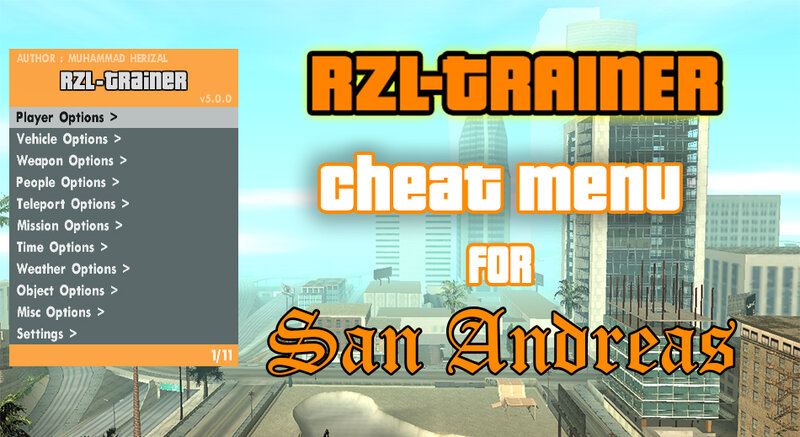
RZL-Trainer v5.0.0 (Cheat Menu)
- muhammad_herizal | uploaded by muhammad_herizal
- gtainside.com/user/muhammad...
- 04/15/2025
- 96496 Downloads
Ratings:
Please sign in first.
Favorites:
Videos
No videos added yet.You need to be signed in to add videos to this mod.
Description
For Cleo 4 minimum is v4.4.0
For Cleo 5 minimun is v5.0.0 RC6
RZL-Trainer v5.0.0
~ Adapted for Cleo 5 (still work fine with cleo 4)
~ Accept button change to ENTER KEY as default
~ New Interface Sound FX
~ Added New Open Menu Key (Ctrl+R, Can change in *INI File)
~ People Options added, it's replace Wanted Options position. Wanted Options merged in Player Options
# Player Options
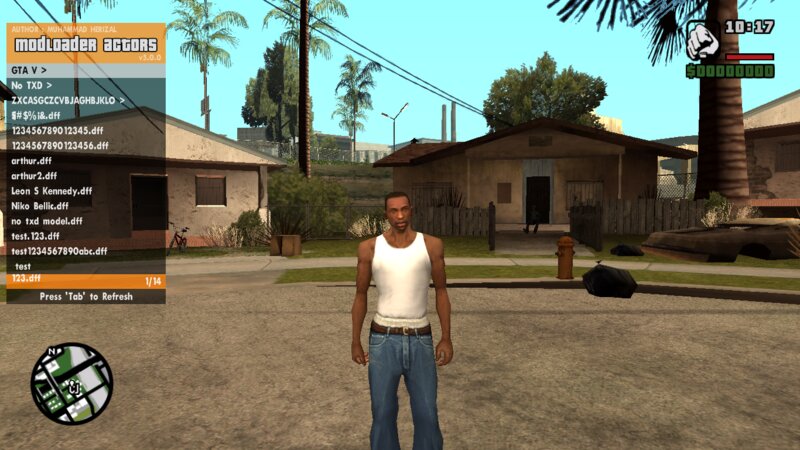
- Change Player > Modloader Skin [Menu Added]
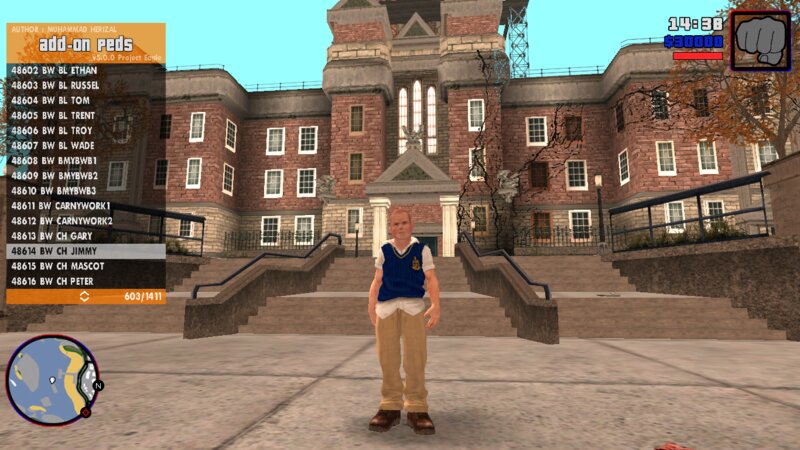
- Change Player > Add-On Peds [New List Menu With Name]
- Change Player > Skin.IMG [no limit, code is rewrite]
- Change Player > Unused Actor [Menu Added]
- Player 2 Options [Menu Added] (Multiplayer Coop Mode)
- No Clip [List Added]
- Free Camera [List Added]
- Clear Player Task [List Added]
- Change Player > Normal Actor [Menu Lag Fixed]
- Change Player > Mute Player When Not CJ [List Added]
- Fighting Style > Mixed 3 Style [List Added]
- Remove Head [List Added]
- Air Break Improvement [Added Hyper Speed Move, And Coord]
- Air Break for Joystick [List Added]
- Health & Armor Regen [Bug Fix]
# Vehicle Options
- Modification [Bug Fixed & Added Camera Focus On Mod Part]
- Vehicle Spawning > +Add-On Vehicles [Lagging Fixed, Now The Menu Is Lighter, Load Thousands List Of Vehicle Is No Problem]
- Vehicle Spawning > Spawn Jetpack (code rewrite)
- Vehicle Spawning > Escape Jetpack When Flying (code rewrite)
- Vehicle Rocket [List Added]
- Vehicle Light [Menu Added]
- Vehicle Health [Note Added]
- Vehicle Door [Note Added]
- No Flying Height Limit [List Added]
- No Jetpack Height Limit [List Added]
- Flipped Cars Not Burn [List Added]
- Vehicle Spawning > +Input Vehicle DFF Name [Fix Enter/Exit Vehicle While Typing, Camera Mode Locked]
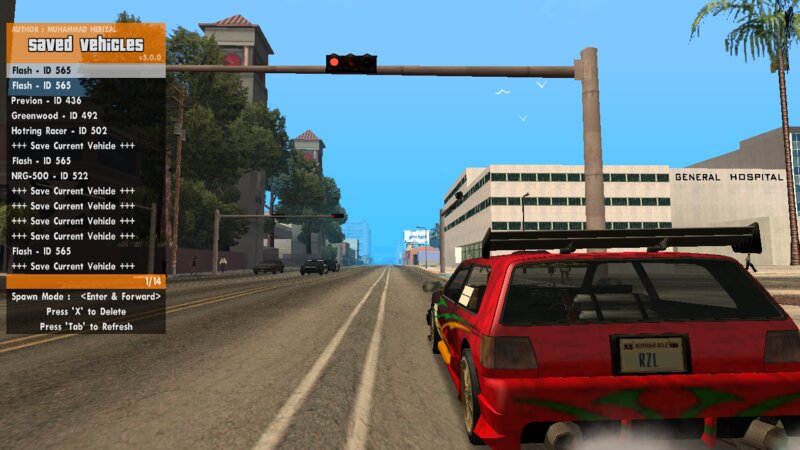
- Vehicle Spawning > +Saved Vehicles [Save And Load Vehicles Menu Merged. Now No Limit Saved Vehicles]
- Nitro Control Percentage [List Added]
- Reapir Improvement [Reapir & Clean]
- Auto Reapir Improvement [Auto Reapir & Clean]
- Spawned Vehicles Allways Clean (Dirt Is 0.0)
- Custom License Plate [List Added]
- Rotate Follow Camera [List Added]
- Speed Control [List Added]
# People Options
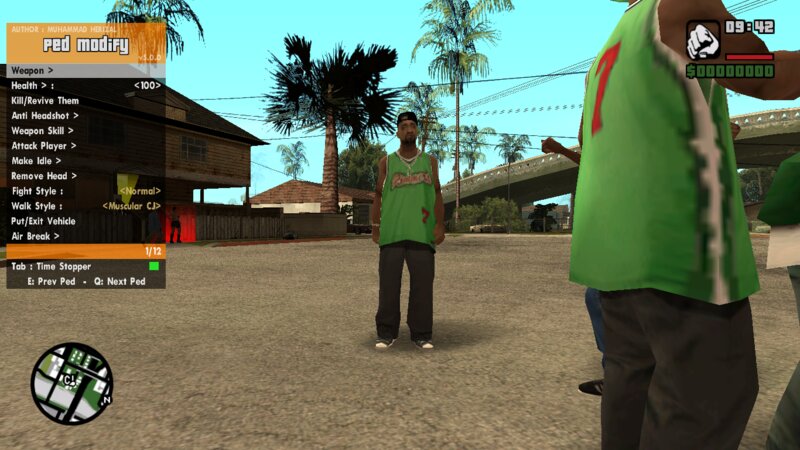
- Nearest Ped Modify [Added Some Feature]
- Modify Ped With AIM [List Added]
# Weapon Options
- Ammo Set [List Added]
- Get a Weapons > Add-On Weapons [Auto Scan With Name And Category]
- Get a Weapons > Input Weapons DFF Name [Menu Added]
# Teleport Options
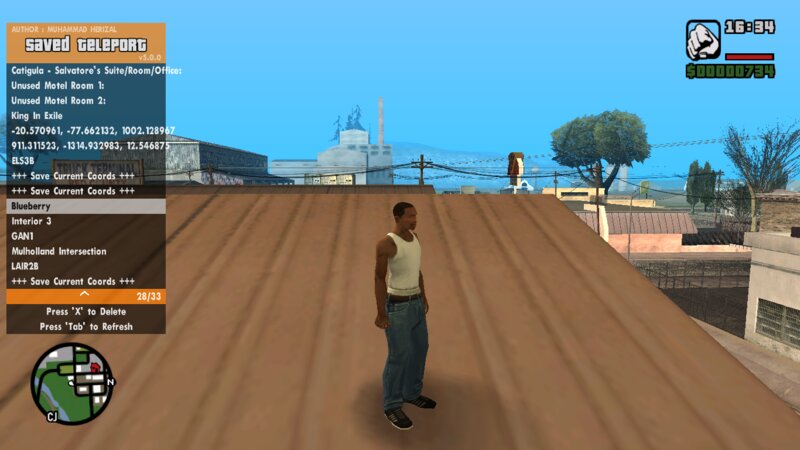
- +Saved Teleport [List Added]
- Interior [8 List Added]
- Snapshot [Note Added]
# Mission Options
- Bypass Mission (Only Work On Default Main.Scm) [List Added]
- Custom Mission Loader [Menu Added]
# Misc Options
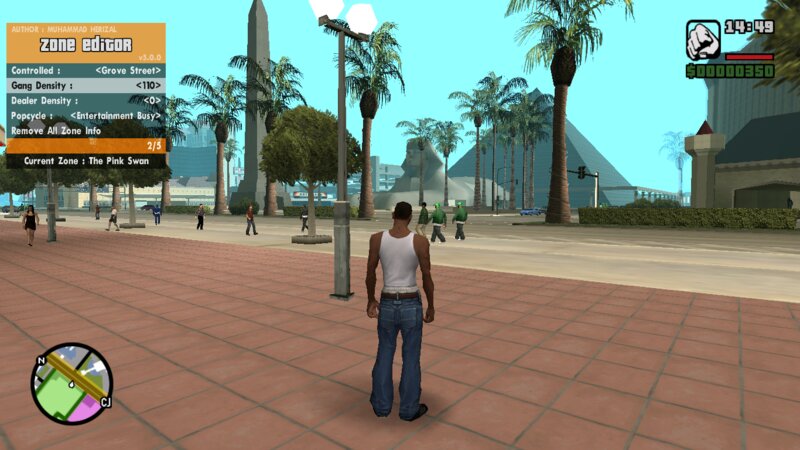
- Zone Editor [Menu Added]
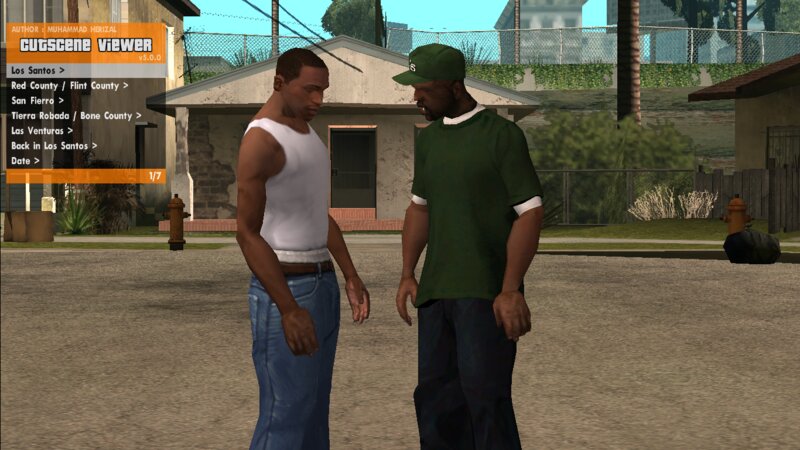
- Cutscene Viewer [Menu Added]
- Solid Water Improvement [Not Remove Object Nearby]
- Disable Screen Fading [List Added]
- Water Modify [Hack Improvement]
- Clear Gray Zone At Pause Map [List Added]
- MP3 Music Player [Lagging Fixed When Many Mp3, Remove Volume Limit, Support Mp2/Ogg/Wav, Bug Fixed]
- Interior Id Changer [List Added]
- Game Info Viewer [Replace Menu Coord Viewer]
# Settings
- Sound FX Settings Menu Changed
- Game Stop If Menu Appear [List Added Again]
- Fast Startup [List Added] (Skip Scaning Add-On Vehicles, Peds, And Weapons On Startup)
- Reset Trainer UI [Ask Command Added]
- Disable All Feature [Ask Command Added]
- Save All Settings [Ask Command Added]
- Load Saved Settings [Ask Command Added]
----------Keyboard----------
F2 Or Ctrl+R = Show/Hide Menu
Numpad 5 or Enter = Accept
Numpad 0 or Backspace = Back
Numpad 8 or Arrow Up = Up
Numpad 2 or Arrow Down = Down
Numpad 4 or Arrow Left = Left
Numpad 6 or Arrow Right = Right
Numpad 9 or Page Up = Up 10/5 Line (If Possible)
Numpad 3 or Page Down = Down 10/5 Line (If Possible)
----------Joypad----------
Hold R1 + Dpad Left = Show/Hide Menu
Dpad Right = Accept
Dpad Left = Back
Dpad Up = Up
Dpad Down = Down
Hold L1 + Dpad Left = Left
Hold L1 + Dpad Right = Right
Hold L1 + Dpad Up = Up 10/5 Line (If Possible)
Hold L1 + Dpad Down = Up 10/5 Line (If Possible)
----------Shorcut Keyboard----------
Alt+1 = Player Options Menu
Alt+2 = Vehicle Options Menu
Alt+3 = Weapon Options Menu
Alt+4 = People Options Menu
Alt+5 = Telepor Options Menu
Alt+6 = Mission Options Menu
Alt+7 = Time Options Menu
Alt+8 = Weather Options Menu
Alt+9 = Object Options Menu
Alt+0 = Misc Options Menu
Atl+Q = Air Break
Atl+F = Eject Form Vehicle
Atl+T = Input Vehicle & Weapon DFF Name
Delete = Teleport To Marker
J = Teleport To Nearest Vehicle As Driver
K = Teleport To Nearest Vehicle As Passenger
' = Go Through
] = Instant Speed Up
[ = Instant Stop
Atl+E = No Clip
Atl+C = Free Camera
G = Vehicle Punch
Tab+1 = Change Player
Tab+2 = Vehicle Spawning
Tab+3 = Get a Weapon
Tab+4 = Actor Spawning
For Cleo 5 minimun is v5.0.0 RC6
RZL-Trainer v5.0.0
~ Adapted for Cleo 5 (still work fine with cleo 4)
~ Accept button change to ENTER KEY as default
~ New Interface Sound FX
~ Added New Open Menu Key (Ctrl+R, Can change in *INI File)
~ People Options added, it's replace Wanted Options position. Wanted Options merged in Player Options
# Player Options
- Change Player > Modloader Skin [Menu Added]
- Change Player > Add-On Peds [New List Menu With Name]
- Change Player > Skin.IMG [no limit, code is rewrite]
- Change Player > Unused Actor [Menu Added]
- Player 2 Options [Menu Added] (Multiplayer Coop Mode)
- No Clip [List Added]
- Free Camera [List Added]
- Clear Player Task [List Added]
- Change Player > Normal Actor [Menu Lag Fixed]
- Change Player > Mute Player When Not CJ [List Added]
- Fighting Style > Mixed 3 Style [List Added]
- Remove Head [List Added]
- Air Break Improvement [Added Hyper Speed Move, And Coord]
- Air Break for Joystick [List Added]
- Health & Armor Regen [Bug Fix]
# Vehicle Options
- Modification [Bug Fixed & Added Camera Focus On Mod Part]
- Vehicle Spawning > +Add-On Vehicles [Lagging Fixed, Now The Menu Is Lighter, Load Thousands List Of Vehicle Is No Problem]
- Vehicle Spawning > Spawn Jetpack (code rewrite)
- Vehicle Spawning > Escape Jetpack When Flying (code rewrite)
- Vehicle Rocket [List Added]
- Vehicle Light [Menu Added]
- Vehicle Health [Note Added]
- Vehicle Door [Note Added]
- No Flying Height Limit [List Added]
- No Jetpack Height Limit [List Added]
- Flipped Cars Not Burn [List Added]
- Vehicle Spawning > +Input Vehicle DFF Name [Fix Enter/Exit Vehicle While Typing, Camera Mode Locked]
- Vehicle Spawning > +Saved Vehicles [Save And Load Vehicles Menu Merged. Now No Limit Saved Vehicles]
- Nitro Control Percentage [List Added]
- Reapir Improvement [Reapir & Clean]
- Auto Reapir Improvement [Auto Reapir & Clean]
- Spawned Vehicles Allways Clean (Dirt Is 0.0)
- Custom License Plate [List Added]
- Rotate Follow Camera [List Added]
- Speed Control [List Added]
# People Options
- Nearest Ped Modify [Added Some Feature]
- Modify Ped With AIM [List Added]
# Weapon Options
- Ammo Set [List Added]
- Get a Weapons > Add-On Weapons [Auto Scan With Name And Category]
- Get a Weapons > Input Weapons DFF Name [Menu Added]
# Teleport Options
- +Saved Teleport [List Added]
- Interior [8 List Added]
- Snapshot [Note Added]
# Mission Options
- Bypass Mission (Only Work On Default Main.Scm) [List Added]
- Custom Mission Loader [Menu Added]
# Misc Options
- Zone Editor [Menu Added]
- Cutscene Viewer [Menu Added]
- Solid Water Improvement [Not Remove Object Nearby]
- Disable Screen Fading [List Added]
- Water Modify [Hack Improvement]
- Clear Gray Zone At Pause Map [List Added]
- MP3 Music Player [Lagging Fixed When Many Mp3, Remove Volume Limit, Support Mp2/Ogg/Wav, Bug Fixed]
- Interior Id Changer [List Added]
- Game Info Viewer [Replace Menu Coord Viewer]
# Settings
- Sound FX Settings Menu Changed
- Game Stop If Menu Appear [List Added Again]
- Fast Startup [List Added] (Skip Scaning Add-On Vehicles, Peds, And Weapons On Startup)
- Reset Trainer UI [Ask Command Added]
- Disable All Feature [Ask Command Added]
- Save All Settings [Ask Command Added]
- Load Saved Settings [Ask Command Added]
----------Keyboard----------
F2 Or Ctrl+R = Show/Hide Menu
Numpad 5 or Enter = Accept
Numpad 0 or Backspace = Back
Numpad 8 or Arrow Up = Up
Numpad 2 or Arrow Down = Down
Numpad 4 or Arrow Left = Left
Numpad 6 or Arrow Right = Right
Numpad 9 or Page Up = Up 10/5 Line (If Possible)
Numpad 3 or Page Down = Down 10/5 Line (If Possible)
----------Joypad----------
Hold R1 + Dpad Left = Show/Hide Menu
Dpad Right = Accept
Dpad Left = Back
Dpad Up = Up
Dpad Down = Down
Hold L1 + Dpad Left = Left
Hold L1 + Dpad Right = Right
Hold L1 + Dpad Up = Up 10/5 Line (If Possible)
Hold L1 + Dpad Down = Up 10/5 Line (If Possible)
----------Shorcut Keyboard----------
Alt+1 = Player Options Menu
Alt+2 = Vehicle Options Menu
Alt+3 = Weapon Options Menu
Alt+4 = People Options Menu
Alt+5 = Telepor Options Menu
Alt+6 = Mission Options Menu
Alt+7 = Time Options Menu
Alt+8 = Weather Options Menu
Alt+9 = Object Options Menu
Alt+0 = Misc Options Menu
Atl+Q = Air Break
Atl+F = Eject Form Vehicle
Atl+T = Input Vehicle & Weapon DFF Name
Delete = Teleport To Marker
J = Teleport To Nearest Vehicle As Driver
K = Teleport To Nearest Vehicle As Passenger
' = Go Through
] = Instant Speed Up
[ = Instant Stop
Atl+E = No Clip
Atl+C = Free Camera
G = Vehicle Punch
Tab+1 = Change Player
Tab+2 = Vehicle Spawning
Tab+3 = Get a Weapon
Tab+4 = Actor Spawning
Comments
There are 32 comments posted yet.














05/04/2025 11:55
First of all hi guys. Thank you so much for the mod, it works better and more stable than the old versions. My only question is how to adjust the player 2 settings. I tried many times and I cannot control the 2nd player. I have an xbox and a pc gamepad. I tried with all of them. I adjusted the joystick settings, but the settings I entered only CJ controlled, the other one is waiting in afk mode. What can we do to move the other player?
Quote | Reply | (0)
First of all hi guys. Thank you so much for the mod, it works better and more stable than the old versions. My only question is how to adjust the player 2 settings. I tried many times and I cannot control the 2nd player. I have an xbox and a pc gamepad. I tried with all of them. I adjusted the joystick settings, but the settings I entered only CJ controlled, the other one is waiting in afk mode. What can we do to move the other player?
Quote | Reply | (0)

04/20/2025 02:48
for Muhammad_Herizal for The Next Update of The RZL Trainer 5.0.0 RC6 if Possible I would like a system that adds a .txd file that uses .png images for the peds skin addon peds and modloader actors in the same style as the GTA V Hud Mod by DK22_Pack and another Things is possible the Traduction in Italian of this Mod Because i am Italian but this is Optional in anyway on the past your old version of the mod the RZL Trainer 4.0.1 helped me a lot it's Very Usefull
Quote | Reply | (0)
for Muhammad_Herizal for The Next Update of The RZL Trainer 5.0.0 RC6 if Possible I would like a system that adds a .txd file that uses .png images for the peds skin addon peds and modloader actors in the same style as the GTA V Hud Mod by DK22_Pack and another Things is possible the Traduction in Italian of this Mod Because i am Italian but this is Optional in anyway on the past your old version of the mod the RZL Trainer 4.0.1 helped me a lot it's Very Usefull
Quote | Reply | (0)