San Andreas / Cars / BMW
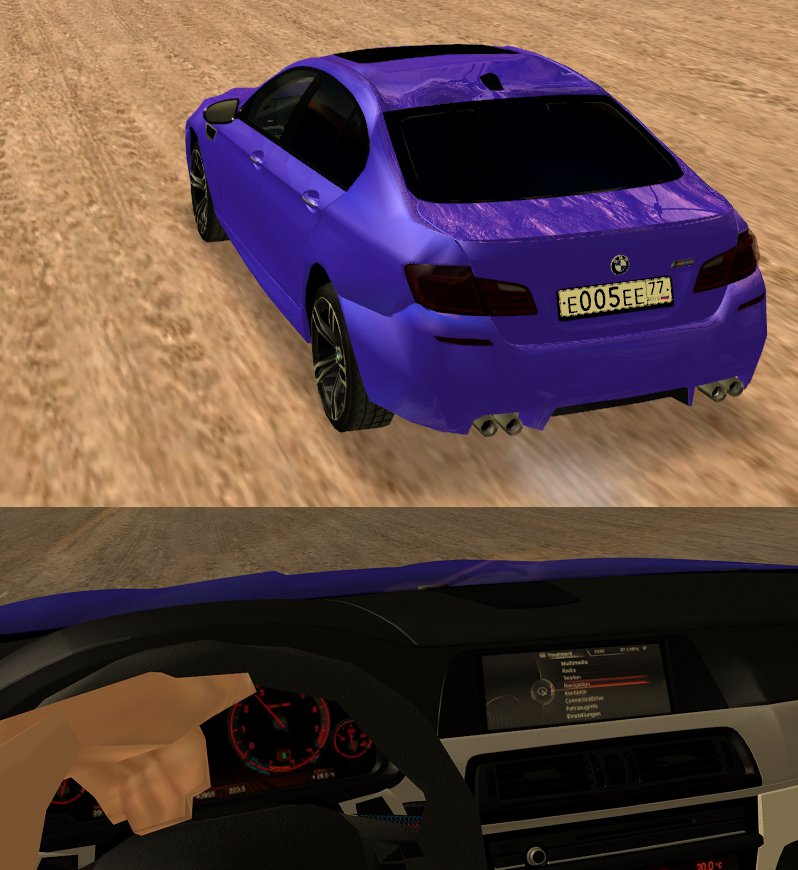
BMW M5 HQ lowest poly/size possible
- Gmer | uploaded by Gmer
- 08/09/2017
- 10334 Downloads
Ratings:
Please sign in first.
Favorites:
Videos

You need to be signed in to add videos to this mod.
Description
This is a remastered version of existing BMW M5 mod where I took off 90% of polycount, I dont know exactly which author but the GTAInside staff are known with my work to provide Low end PC players with accessible, nonlagging mods so I expect no issues.
So here we go;
- Kept it HQ as possible with the lowest achievable poly and TXD specs
- It still also has great damage parts.
So now you got a fairly good looking BMW M5 that wont give much FPS lag.
For what you expect as details that you need not to insult cars like a BMW, this is the best poly/quality ratio possible.
The DFF is 3.7 MB.
So here we go;
- Kept it HQ as possible with the lowest achievable poly and TXD specs
- It still also has great damage parts.
So now you got a fairly good looking BMW M5 that wont give much FPS lag.
For what you expect as details that you need not to insult cars like a BMW, this is the best poly/quality ratio possible.
The DFF is 3.7 MB.
Comments
There are 11 comments posted yet.






08/09/2017 17:29
so 3Ds has that 'fuction' and you can split the models per texture (zmodeler can do that i do with gta v parts) and then use that automatic reduction but recently i got a better pc (not a titan is a HP G56) but i dont have that joy to do models now but slowly im returning (i mean i have 3 to upload but im lazy [aka real life work all day, annoying costumers and when i arrive home i have to help my mom with house stuff put the table to lunch/diner when my sister could do that ... ])
Quote | Reply
Quote: Gmer
@luf2014
I don't use Blender but 3DS 2017, and I use both manual and automated ways. All of my 'lowpoly' mods are a combo of first automatic reduction, then manual recovery of spots that start looking bad and vertex merging, then using a RW intepreter tool to regenerate clean polys (further reducing the filesize) which calculates the amount needed for proper porportions, then again I edit the newly generated polys and reduce them.
It's a more time intensive process that requires skills estimating how far you can go and what part you need to manually recover/repair (depending on what it is and where it's located/how much it affects the model general looks) and this process you need to master.
so 3Ds has that 'fuction' and you can split the models per texture (zmodeler can do that i do with gta v parts) and then use that automatic reduction but recently i got a better pc (not a titan is a HP G56) but i dont have that joy to do models now but slowly im returning (i mean i have 3 to upload but im lazy [aka real life work all day, annoying costumers and when i arrive home i have to help my mom with house stuff put the table to lunch/diner when my sister could do that ... ])
Quote | Reply
08/09/2017 16:06
@luf2014
I don't use Blender but 3DS 2017, and I use both manual and automated ways. All of my 'lowpoly' mods are a combo of first automatic reduction, then manual recovery of spots that start looking bad and vertex merging, then using a RW intepreter tool to regenerate clean polys (further reducing the filesize) which calculates the amount needed for proper porportions, then again I edit the newly generated polys and reduce them.
It's a more time intensive process that requires skills estimating how far you can go and what part you need to manually recover/repair (depending on what it is and where it's located/how much it affects the model general looks) and this process you need to master.
Quote | Reply
@luf2014
I don't use Blender but 3DS 2017, and I use both manual and automated ways. All of my 'lowpoly' mods are a combo of first automatic reduction, then manual recovery of spots that start looking bad and vertex merging, then using a RW intepreter tool to regenerate clean polys (further reducing the filesize) which calculates the amount needed for proper porportions, then again I edit the newly generated polys and reduce them.
It's a more time intensive process that requires skills estimating how far you can go and what part you need to manually recover/repair (depending on what it is and where it's located/how much it affects the model general looks) and this process you need to master.
Quote | Reply