GTA V / Tools / Other
Play GTA 5 PC Through Your Phone/Tablet (Apple Android Microsoft Phones work) - Supplement Scripts for Remotr
- TheRealFookin | uploaded by TheRealFookin
- gta5-mods.com/tools/supplem...
- 03/10/2016
- 26008 Downloads
Ratings:
Please sign in first.
Favorites:
Videos

You need to be signed in to add videos to this mod.
Description
I OWN THIS MOD I AM THEREALFOOKIN PROOF HERE http://imgur.com/jxFxNsk http://imgur.com/2XbwXuk
IF YOU PLAY ON PS4 AND WANT TO USE THIS MOD!!!
https://www.youtube.com/watch?v=TpRrBb8QyHY\
I DONT OWN THIS VIDEO
YOU HAVE TO RUN THIS GAME ON 1280x720 FOR THIS GAME TO RUN SMOOTH!! AND WINDOWED MODE WOULD MAKE IT RUN BETTER, AND IT WILL BE FULLSCREEN ON PHONE BUT WINDOWED ON PC
I DO NOT OWN REMOTR!
Ever thought of taking a shit and playing GTA 5 at the same time? Or going to kitchen and making some tea and playing GTA 5? Now you can,
This mod will allow you to play GTA V through your phone, this works on any phone, but first off download http://remotrapp.com/
Instructions:
Step 1: Download my mod
Step 2: Open IP ADDRESS (SAFE)
Step 3: Find IPv4 Address. . . . . . . . . . . : (Your IP Address) you will need this
Step 4: Go to your pc and click on start menu and search 'This PC' and right click on 'This PC' and hit properties and find Full PC's Name You will need the IP Address and PC's name
Step 5: Download RemotR http://remotrapp.com/ and download RemotR on your phone (Microsoft Phone, Android Phone, Apple Phone, doesn't matter)
Step 6: Open RemotR on your PC
Step 7: Put my mod (Script.dll) in the RemotR Directory
Step 8: Open up RemotR on your phone and copy the IP Address and PC's Name on the RemotR app
Step 9: Wait for the icon of a pc to turn white and click on it
Step 10: Find GTA V or go scroll down till you find "Desktop" and click on that
Play GTA Online or Story Mode
THIS MOD WORKS FOR ONLINE BECAUSE IT DOESN'T HAVE ANYTHING MODDED IN THE GAME!
1.1
-Added in Config.dll
-Added MCVP.dll
1.2
-I added in SOO Much more dll files
IF YOU DONT WANT THE CONTROLS!!
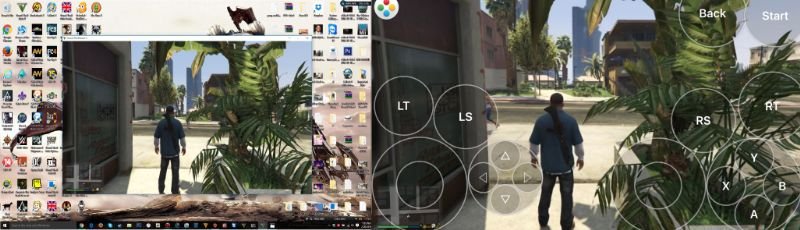
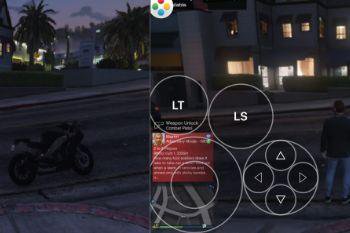
PS: If you dont want the annoying contols showing on your screen then click on the icon on the top left center of your screen and find the xbox 360 controler icon, and find Torchlight Default and click on it and get out of the app quick and get back on and connect to your pc, thats it.
IF YOU PLAY ON PS4 AND WANT TO USE THIS MOD!!!
https://www.youtube.com/watch?v=TpRrBb8QyHY\
I DONT OWN THIS VIDEO
YOU HAVE TO RUN THIS GAME ON 1280x720 FOR THIS GAME TO RUN SMOOTH!! AND WINDOWED MODE WOULD MAKE IT RUN BETTER, AND IT WILL BE FULLSCREEN ON PHONE BUT WINDOWED ON PC
I DO NOT OWN REMOTR!
Ever thought of taking a shit and playing GTA 5 at the same time? Or going to kitchen and making some tea and playing GTA 5? Now you can,
This mod will allow you to play GTA V through your phone, this works on any phone, but first off download http://remotrapp.com/
Instructions:
Step 1: Download my mod
Step 2: Open IP ADDRESS (SAFE)
Step 3: Find IPv4 Address. . . . . . . . . . . : (Your IP Address) you will need this
Step 4: Go to your pc and click on start menu and search 'This PC' and right click on 'This PC' and hit properties and find Full PC's Name You will need the IP Address and PC's name
Step 5: Download RemotR http://remotrapp.com/ and download RemotR on your phone (Microsoft Phone, Android Phone, Apple Phone, doesn't matter)
Step 6: Open RemotR on your PC
Step 7: Put my mod (Script.dll) in the RemotR Directory
Step 8: Open up RemotR on your phone and copy the IP Address and PC's Name on the RemotR app
Step 9: Wait for the icon of a pc to turn white and click on it
Step 10: Find GTA V or go scroll down till you find "Desktop" and click on that
Play GTA Online or Story Mode
THIS MOD WORKS FOR ONLINE BECAUSE IT DOESN'T HAVE ANYTHING MODDED IN THE GAME!
1.1
-Added in Config.dll
-Added MCVP.dll
1.2
-I added in SOO Much more dll files
IF YOU DONT WANT THE CONTROLS!!
PS: If you dont want the annoying contols showing on your screen then click on the icon on the top left center of your screen and find the xbox 360 controler icon, and find Torchlight Default and click on it and get out of the app quick and get back on and connect to your pc, thats it.
Comments
There are 7 comments posted yet.