GTA V / Skins / New look / model
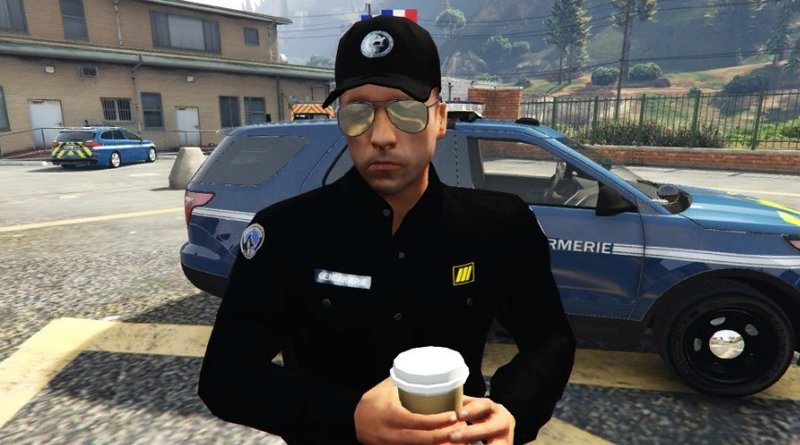
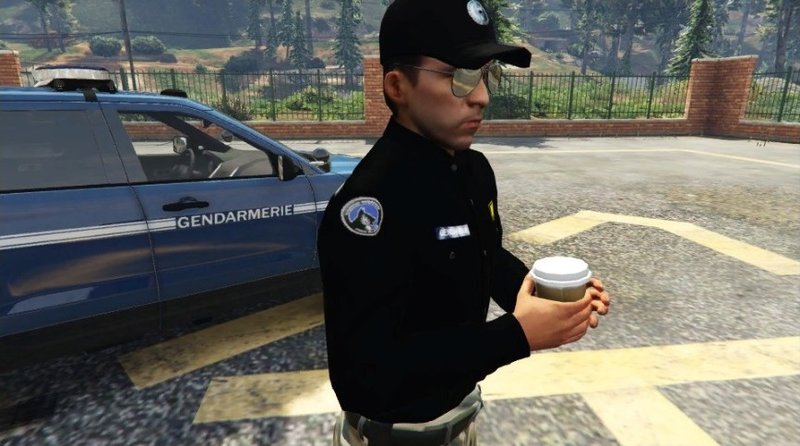
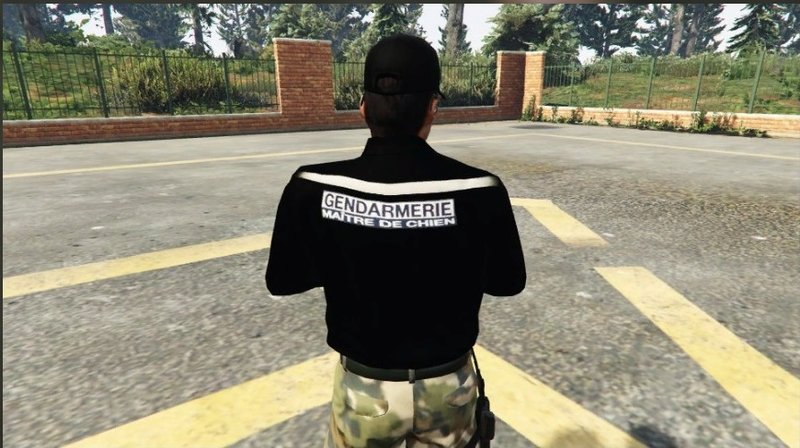
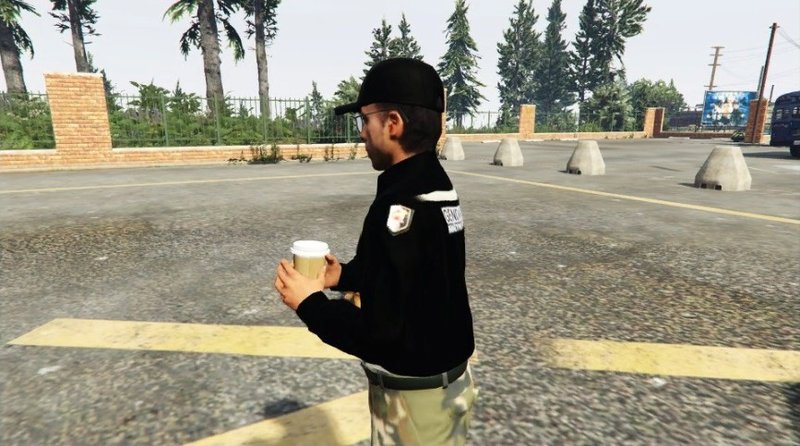
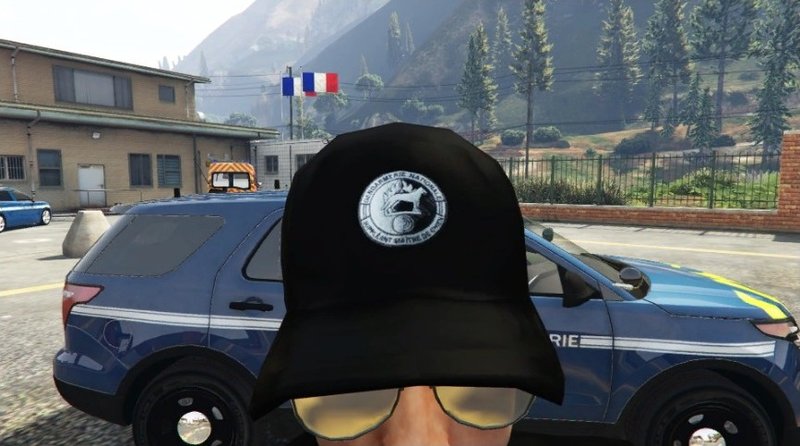
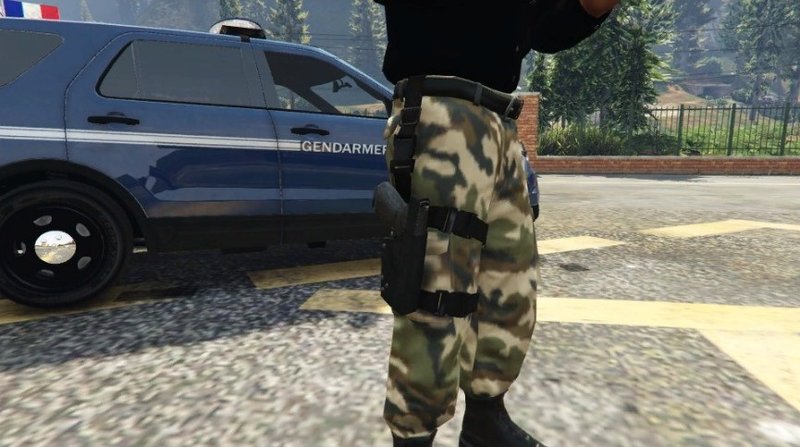
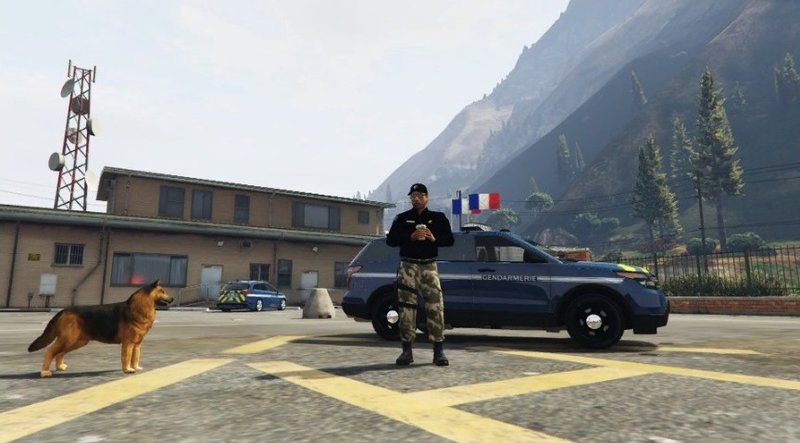
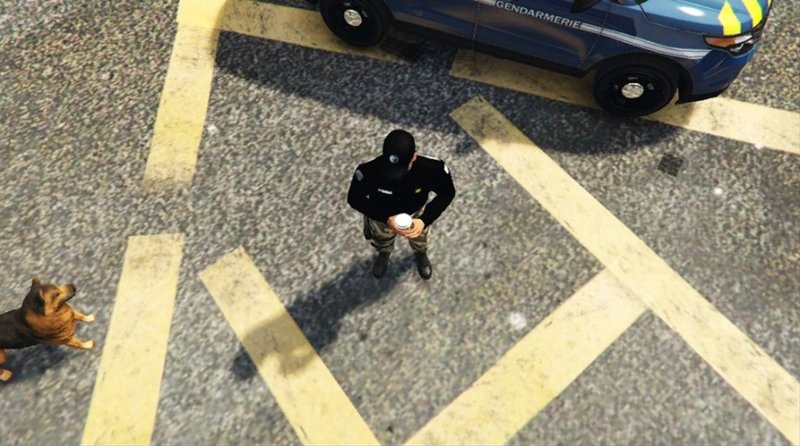
Tenue (Model + Texture) Maître Chien Gendarmerie
- NitramO
- youtube.com/channel/UC9FUVD...
- 05/18/2018
- 2222 Downloads
Ratings:
Please sign in first.
Favorites:
Videos
No videos added yet.You need to be signed in to add videos to this mod.
Description
Tenue réaliste (grade et écussons) de Maître chien de la Gendarmerie en France !
basée sur le modèle "prison guard"
Crédits :
3D model : by Rockstar - modified by NitramO
Textures : by NitramO
PLEASE DON'T UPLOAD WITHOUT MY AUTHORIZATION !
S'IL VOUS PLAIS NE PAS UPLOAD SANS MON AUTORISATION !
Installation outfit / tenue :
En / Us :
1 - Unzip archive
2 - Use the software "OpenIV" - http://openiv.com/
3 - Go to Grand Theft Auto V|mods/update/x64/dlcpacks/mpheist/dlc.rpf/x64/models/cdimages/mpheist_componentpeds.rpf
4 - Think make backup, if you don't have make, i give you backup(originals files of game) in archive
5 - You can use the "mods folder" mode with OpenIV for don't replace orignals files of game !
6 - Go to "edit mod" and just replace all files "u_m_m_doa_01" in the OpenIV destination by all the files of the same name in folder of this txt !
7 - have fun, you can play with this mod !
Fr :
1 - Dézipez l'archive
2 - Utilisez le logiciel "OpenIV" - http://openiv.com/
3 - Allez à Grand Theft Auto V|mods/update/x64/dlcpacks/mpheist/dlc.rpf/x64/models/cdimages/mpheist_componentpeds.rpf
4 - Pensez à faire des backup, Si vous n'en avez pas fait, je vous donne des backup(fichiers originals du jeu) dans l'archive
5 - Vous pouvez utiliser le mode "dossier mods" avec OpenIV pour ne pas remplacer les fichiers originals du jeu !
6 - Allez à "mode édition" et remplacez simplement tout les fihciers "u_m_m_doa_01" dans la destnation OpenIV par tout les fichiers du même nom dans le dossier de ce txt !
7 - Amusez vous bien, vous pouvez jouer avec ce mod !
Installation Hat / casquette :
En / Us :
1 - Unzip archive
2 - Use the software "OpenIV" - http://openiv.com/
3 - Go to Grand Theft Auto V|mods/update/x64/dlcpacks/mpheist/dlc.rpf/x64/models/cdimages/mpheist_componentpeds_p.rpf
4 - Think make backup, if you don't have make, i give you backup(originals files of game) in archive
5 - You can use the "mods folder" mode with OpenIV for don't replace orignals files of game !
6 - Go to "edit mod" and just replace all files "u_m_m_doa_01_p" in the OpenIV destination by all the files of the same name in folder of this txt !
7 - have fun, you can play with this mod !
Fr :
1 - Dézipez l'archive
2 - Utilisez le logiciel "OpenIV" - http://openiv.com/
3 - Allez à Grand Theft Auto V|mods/update/x64/dlcpacks/mpheist/dlc.rpf/x64/models/cdimages/mpheist_componentpeds_p.rpf
4 - Pensez à faire des backup, Si vous n'en avez pas fait, je vous donne des backup(fichiers originals du jeu) dans l'archive
5 - Vous pouvez utiliser le mode "dossier mods" avec OpenIV pour ne pas remplacer les fichiers originals du jeu !
6 - Allez à "mode édition" et remplacez simplement tout les fichiers "u_m_m_doa_01_p" dans la destination OpenIV par tout les fichiers du même nom dans le dossier de ce txt !
7 - Amusez vous bien, vous pouvez jouer avec ce mod !
PLEASE DON'T UPLOAD WITHOUT MY AUTHORIZATION !
S'IL VOUS PLAIS NE PAS UPLOAD SANS MON AUTORISATION !
Des backups sont a votre disposition !
Voila ^^ amusez vous bien, bonne game !
basée sur le modèle "prison guard"
Crédits :
3D model : by Rockstar - modified by NitramO
Textures : by NitramO
PLEASE DON'T UPLOAD WITHOUT MY AUTHORIZATION !
S'IL VOUS PLAIS NE PAS UPLOAD SANS MON AUTORISATION !
Installation outfit / tenue :
En / Us :
1 - Unzip archive
2 - Use the software "OpenIV" - http://openiv.com/
3 - Go to Grand Theft Auto V|mods/update/x64/dlcpacks/mpheist/dlc.rpf/x64/models/cdimages/mpheist_componentpeds.rpf
4 - Think make backup, if you don't have make, i give you backup(originals files of game) in archive
5 - You can use the "mods folder" mode with OpenIV for don't replace orignals files of game !
6 - Go to "edit mod" and just replace all files "u_m_m_doa_01" in the OpenIV destination by all the files of the same name in folder of this txt !
7 - have fun, you can play with this mod !
Fr :
1 - Dézipez l'archive
2 - Utilisez le logiciel "OpenIV" - http://openiv.com/
3 - Allez à Grand Theft Auto V|mods/update/x64/dlcpacks/mpheist/dlc.rpf/x64/models/cdimages/mpheist_componentpeds.rpf
4 - Pensez à faire des backup, Si vous n'en avez pas fait, je vous donne des backup(fichiers originals du jeu) dans l'archive
5 - Vous pouvez utiliser le mode "dossier mods" avec OpenIV pour ne pas remplacer les fichiers originals du jeu !
6 - Allez à "mode édition" et remplacez simplement tout les fihciers "u_m_m_doa_01" dans la destnation OpenIV par tout les fichiers du même nom dans le dossier de ce txt !
7 - Amusez vous bien, vous pouvez jouer avec ce mod !
Installation Hat / casquette :
En / Us :
1 - Unzip archive
2 - Use the software "OpenIV" - http://openiv.com/
3 - Go to Grand Theft Auto V|mods/update/x64/dlcpacks/mpheist/dlc.rpf/x64/models/cdimages/mpheist_componentpeds_p.rpf
4 - Think make backup, if you don't have make, i give you backup(originals files of game) in archive
5 - You can use the "mods folder" mode with OpenIV for don't replace orignals files of game !
6 - Go to "edit mod" and just replace all files "u_m_m_doa_01_p" in the OpenIV destination by all the files of the same name in folder of this txt !
7 - have fun, you can play with this mod !
Fr :
1 - Dézipez l'archive
2 - Utilisez le logiciel "OpenIV" - http://openiv.com/
3 - Allez à Grand Theft Auto V|mods/update/x64/dlcpacks/mpheist/dlc.rpf/x64/models/cdimages/mpheist_componentpeds_p.rpf
4 - Pensez à faire des backup, Si vous n'en avez pas fait, je vous donne des backup(fichiers originals du jeu) dans l'archive
5 - Vous pouvez utiliser le mode "dossier mods" avec OpenIV pour ne pas remplacer les fichiers originals du jeu !
6 - Allez à "mode édition" et remplacez simplement tout les fichiers "u_m_m_doa_01_p" dans la destination OpenIV par tout les fichiers du même nom dans le dossier de ce txt !
7 - Amusez vous bien, vous pouvez jouer avec ce mod !
PLEASE DON'T UPLOAD WITHOUT MY AUTHORIZATION !
S'IL VOUS PLAIS NE PAS UPLOAD SANS MON AUTORISATION !
Des backups sont a votre disposition !
Voila ^^ amusez vous bien, bonne game !
Comments
There are 1 comments posted yet.