GTA V / Mods / Modifications
GTA V Extreme Clear HD Weather v1.2
- GTA Series Fans | uploaded by GTA Series Fans
- 07/02/2015
- 9185 Downloads
Ratings:
Please sign in first.
Favorites:
Download
14.29Mb
14.29Mb
Videos
No videos added yet.You need to be signed in to add videos to this mod.
Description
This mod was made by me: Panca A. Mukti (GTA Series Fans - Indonesian Guy).
NOTICE To downloader:
=========================
Here my files doesn't include Sweet-FX, NativeTrainer.ASI and other files that I didn't create. Even Sweet-FX really needed to support this mod, but you can find it on google search very easy. I just modified all weather files both inside COMMON.RPF and UPDATE.RPF.
HOW TO INSTALL:
=========================
After finish downloading & extract the RAR files, Open folder "EXTREME HD WEATHER" and then use OPENIV to replace all the files inside:
1). Grand Theft Auto V\update\update.RPF\common\data
2). Grand Theft Auto V\update\update.RPF\common\data\levels\gta5\weather
3). Grand Theft Auto V\update\update.RPF\common\data\timecycle
AND ...
1). Grand Theft Auto V\common.RPF\data
2). Grand Theft Auto V\common.RPF\data\levels\gta5
3). Grand Theft Auto V\common.RPF\data\levels\gta5\weather
4). Grand Theft Auto V\common.RPF\data\timecycle
After finish replacing all files using OPENIV, now open folder "BONUS", just copy paste "commandline.txt" (for increase speed, reduce lags...etc) and folder "SWEETFX" (replace settings files) ...into your GTA V game directory. FINISHED, Run the game.
DESCRIPTIONS:
=========================
VERSION v1.1:
=========================
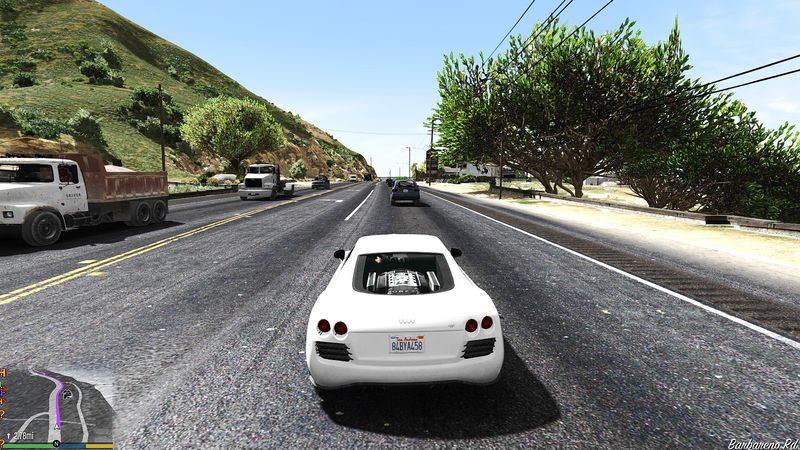
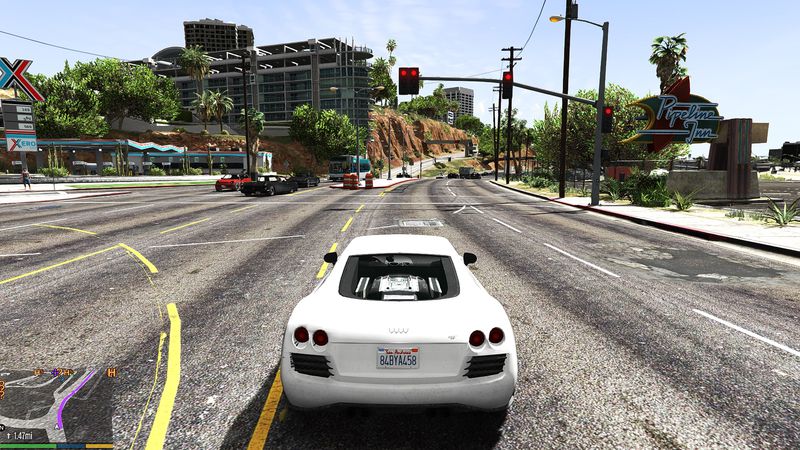
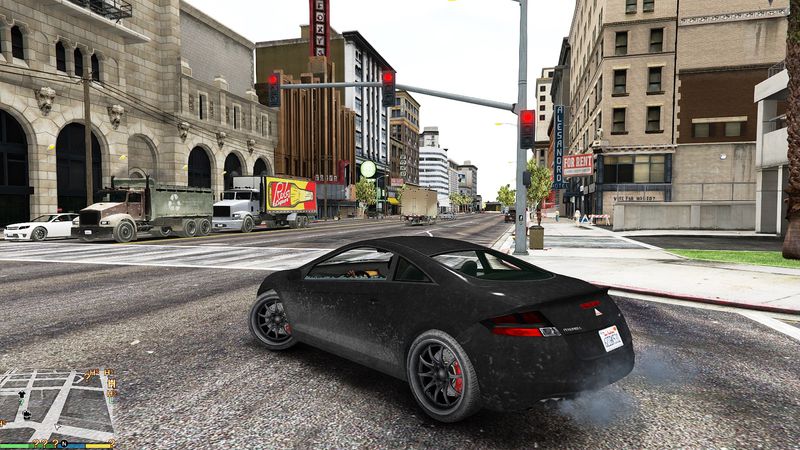
1. Removes fog, blur, blend, DOF and other adverse effects.
2. Increasing clear LOD HD vision for kilometers /miles Field Of View (FOV).
3. Increasing all low textures views into High Definition vision.
4. More stable, faster & Anti-Laggy with incredible graphic enhancement.
5. Support processor Core i3, Core i5 & Core i7.
VERSION v1.2:
=========================
1. Removes unsuitable RGB color environment luminatic screen tonemap effects.
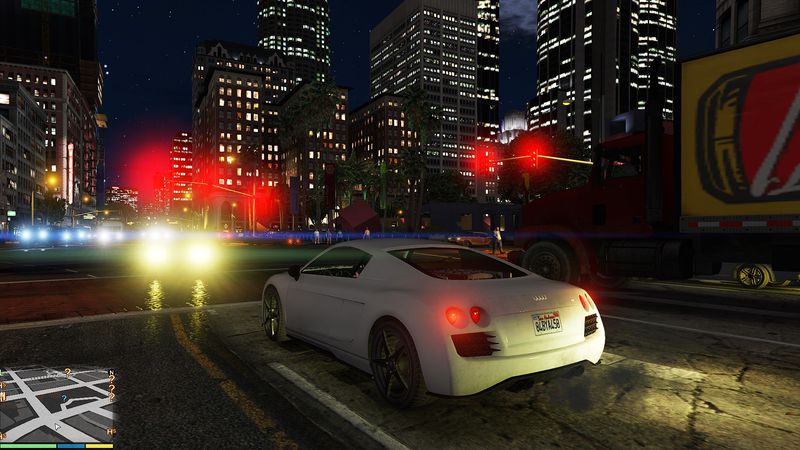
2. Increasing high definition resolution light ambient intensity for daylight & night.
3. Adding sky clouds texture for all snowing weather.
4. Matching PostFX color into real life weather.
5. More clear Level Of Detail views when you diving on the ocean.
For those GTA V gamer who still like play the game with fog effects, I will release it in the next version.....please give comment after you try my mods, I will be delighted to help you if there is some bugs found. Thank you.
THANKS FOR DOWNLOADING, HAPPY PLAYING THE NEW LOOK OF GTAV GAME, IT'S BETTER IF YOU PLAY FROM THE BEGINNING SO YOU CAN SEE THE BEST HD WEATHER VISION.
WARNING !!!
=========================
DO NOT EDIT MY MOD WITHOUT MY PERMISSIONS OR MAKE YOUR OWN VIDEO USING MY MOD WITHOUT PUT MY NAME (CREDITS) INSIDE THE VIDEO.
DEPOK II TIMUR (JABAR) - INDONESIA, July 05, 2015
NOTICE To downloader:
=========================
Here my files doesn't include Sweet-FX, NativeTrainer.ASI and other files that I didn't create. Even Sweet-FX really needed to support this mod, but you can find it on google search very easy. I just modified all weather files both inside COMMON.RPF and UPDATE.RPF.
HOW TO INSTALL:
=========================
After finish downloading & extract the RAR files, Open folder "EXTREME HD WEATHER" and then use OPENIV to replace all the files inside:
1). Grand Theft Auto V\update\update.RPF\common\data
2). Grand Theft Auto V\update\update.RPF\common\data\levels\gta5\weather
3). Grand Theft Auto V\update\update.RPF\common\data\timecycle
AND ...
1). Grand Theft Auto V\common.RPF\data
2). Grand Theft Auto V\common.RPF\data\levels\gta5
3). Grand Theft Auto V\common.RPF\data\levels\gta5\weather
4). Grand Theft Auto V\common.RPF\data\timecycle
After finish replacing all files using OPENIV, now open folder "BONUS", just copy paste "commandline.txt" (for increase speed, reduce lags...etc) and folder "SWEETFX" (replace settings files) ...into your GTA V game directory. FINISHED, Run the game.
DESCRIPTIONS:
=========================
VERSION v1.1:
=========================
1. Removes fog, blur, blend, DOF and other adverse effects.
2. Increasing clear LOD HD vision for kilometers /miles Field Of View (FOV).
3. Increasing all low textures views into High Definition vision.
4. More stable, faster & Anti-Laggy with incredible graphic enhancement.
5. Support processor Core i3, Core i5 & Core i7.
VERSION v1.2:
=========================
1. Removes unsuitable RGB color environment luminatic screen tonemap effects.
2. Increasing high definition resolution light ambient intensity for daylight & night.
3. Adding sky clouds texture for all snowing weather.
4. Matching PostFX color into real life weather.
5. More clear Level Of Detail views when you diving on the ocean.
For those GTA V gamer who still like play the game with fog effects, I will release it in the next version.....please give comment after you try my mods, I will be delighted to help you if there is some bugs found. Thank you.
THANKS FOR DOWNLOADING, HAPPY PLAYING THE NEW LOOK OF GTAV GAME, IT'S BETTER IF YOU PLAY FROM THE BEGINNING SO YOU CAN SEE THE BEST HD WEATHER VISION.
WARNING !!!
=========================
DO NOT EDIT MY MOD WITHOUT MY PERMISSIONS OR MAKE YOUR OWN VIDEO USING MY MOD WITHOUT PUT MY NAME (CREDITS) INSIDE THE VIDEO.
DEPOK II TIMUR (JABAR) - INDONESIA, July 05, 2015
Comments
There are 14 comments posted yet.




07/04/2015 02:56

Quote | Reply
excellent settings ...Quote: Executioner
Hello My Friend.
I suggest that you should use these settings
/*----------------------.
| :: Global Settings :: |
'----------------------*/
#define ReShade_ToggleKey VK_SCROLL //Set the key that should toggle the effects On/Off
#define ReShade_DepthToggleKey VK_MULTIPLY //Set the key to toggle the depth view On/Off
#define ReShade_Start_Enabled 0 //[0 or 1] Start with the effects enabled or disabled?
#define ReShade_Screenshot_Format 2 //[1 or 2] Sets the screenshot format (1 = bmp, 2 = png) You can take screenshots by pressing PrintScreen
#define ReShade_ShowToggleMessage 0 //[0 or 1] When enabled a message will show when the effects are toggled.
#define SweetFX_Greeting 0 //[0 or 1] Show the SweetFX greeting text on startup.
// -- Statistics --
#define ReShade_ShowStatistics 0 //[0 or 1] Controls the display of the statistics (fps and timecounters). 0 = off, 1 = on
#define ReShade_ShowClock 0 //[0 or 1] Show a clock
#define ReShade_ShowFPS 0 //[0 or 1] Show the FPS

When the game starts writing can not be seen.
When enabled, the posts can not be seen.
You can try it.
Quote | Reply

07/03/2015 19:52
Hello My Friend.
I suggest that you should use these settings
/*----------------------.
| :: Global Settings :: |
'----------------------*/
#define ReShade_ToggleKey VK_SCROLL //Set the key that should toggle the effects On/Off
#define ReShade_DepthToggleKey VK_MULTIPLY //Set the key to toggle the depth view On/Off
#define ReShade_Start_Enabled 0 //[0 or 1] Start with the effects enabled or disabled?
#define ReShade_Screenshot_Format 2 //[1 or 2] Sets the screenshot format (1 = bmp, 2 = png) You can take screenshots by pressing PrintScreen
#define ReShade_ShowToggleMessage 0 //[0 or 1] When enabled a message will show when the effects are toggled.
#define SweetFX_Greeting 0 //[0 or 1] Show the SweetFX greeting text on startup.
// -- Statistics --
#define ReShade_ShowStatistics 0 //[0 or 1] Controls the display of the statistics (fps and timecounters). 0 = off, 1 = on
#define ReShade_ShowClock 0 //[0 or 1] Show a clock
#define ReShade_ShowFPS 0 //[0 or 1] Show the FPS
When the game starts writing can not be seen.
When enabled, the posts can not be seen.
You can try it.


Quote | Reply
Hello My Friend.
I suggest that you should use these settings
/*----------------------.
| :: Global Settings :: |
'----------------------*/
#define ReShade_ToggleKey VK_SCROLL //Set the key that should toggle the effects On/Off
#define ReShade_DepthToggleKey VK_MULTIPLY //Set the key to toggle the depth view On/Off
#define ReShade_Start_Enabled 0 //[0 or 1] Start with the effects enabled or disabled?
#define ReShade_Screenshot_Format 2 //[1 or 2] Sets the screenshot format (1 = bmp, 2 = png) You can take screenshots by pressing PrintScreen
#define ReShade_ShowToggleMessage 0 //[0 or 1] When enabled a message will show when the effects are toggled.
#define SweetFX_Greeting 0 //[0 or 1] Show the SweetFX greeting text on startup.
// -- Statistics --
#define ReShade_ShowStatistics 0 //[0 or 1] Controls the display of the statistics (fps and timecounters). 0 = off, 1 = on
#define ReShade_ShowClock 0 //[0 or 1] Show a clock
#define ReShade_ShowFPS 0 //[0 or 1] Show the FPS
When the game starts writing can not be seen.
When enabled, the posts can not be seen.
You can try it.
Quote | Reply
07/03/2015 17:18
 ...
...
This is my "Global_Settings.txt" inside folder SweetFX:
#define ReShade_ToggleKey VK_SCROLL //effects On/Off
#define ReShade_DepthToggleKey VK_MULTIPLY //depth view On/Off
#define ReShade_Start_Enabled 0 //[0 or 1] Start with the effects enabled or disabled?
#define ReShade_Screenshot_Format 2 //[1 or 2] Sets the screenshot format (1 = bmp, 2 = png) You can take screenshots by pressing PrintScreen
#define ReShade_ShowToggleMessage 1 //[0 or 1] When enabled a message will show when the effects are toggled.
#define SweetFX_Greeting 0 //[0 or 1] Show the SweetFX greeting text on startup.
// -- Statistics --
#define ReShade_ShowStatistics 0 //[0 or 1] Controls the display of the statistics (fps and timecounters). 0 = off, 1 = on
#define ReShade_ShowClock 0 //[0 or 1] Show a clock
#define ReShade_ShowFPS 0 //[0 or 1] Show the FPS
Mine is "Scroll Lock" to activate ....
Quote | Reply
Thanks for the rate my friend...hope you like it...Quote: Executioner
Hello I Inistall This Mod Em... Thats Very Nice !!!
#define ReShade_Start_Enabled 1 Game Has Crash And Low Frame You Can Set It 0 And After Loading The Game You Can Prees F12 .
F12 Has Enable,Disable This Mod
I Replace It To F11 Becouse Thats Better
9/10 I Rated This
...
This is my "Global_Settings.txt" inside folder SweetFX:
#define ReShade_ToggleKey VK_SCROLL //effects On/Off
#define ReShade_DepthToggleKey VK_MULTIPLY //depth view On/Off
#define ReShade_Start_Enabled 0 //[0 or 1] Start with the effects enabled or disabled?
#define ReShade_Screenshot_Format 2 //[1 or 2] Sets the screenshot format (1 = bmp, 2 = png) You can take screenshots by pressing PrintScreen
#define ReShade_ShowToggleMessage 1 //[0 or 1] When enabled a message will show when the effects are toggled.
#define SweetFX_Greeting 0 //[0 or 1] Show the SweetFX greeting text on startup.
// -- Statistics --
#define ReShade_ShowStatistics 0 //[0 or 1] Controls the display of the statistics (fps and timecounters). 0 = off, 1 = on
#define ReShade_ShowClock 0 //[0 or 1] Show a clock
#define ReShade_ShowFPS 0 //[0 or 1] Show the FPS
Mine is "Scroll Lock" to activate ....
Quote | Reply

07/02/2015 19:30
Hello I Inistall This Mod Em... Thats Very Nice !!!
#define ReShade_Start_Enabled 1 Game Has Crash And Low Frame You Can Set It 0 And After Loading The Game You Can Prees F12 .
F12 Has Enable,Disable This Mod
I Replace It To F11 Becouse Thats Better
I Use Many Modes And Create Some One
9/10 I Rated This
Quote | Reply
Hello I Inistall This Mod Em... Thats Very Nice !!!
#define ReShade_Start_Enabled 1 Game Has Crash And Low Frame You Can Set It 0 And After Loading The Game You Can Prees F12 .
F12 Has Enable,Disable This Mod
I Replace It To F11 Becouse Thats Better
I Use Many Modes And Create Some One
9/10 I Rated This
Quote | Reply