GTA V / Mods / Buildings
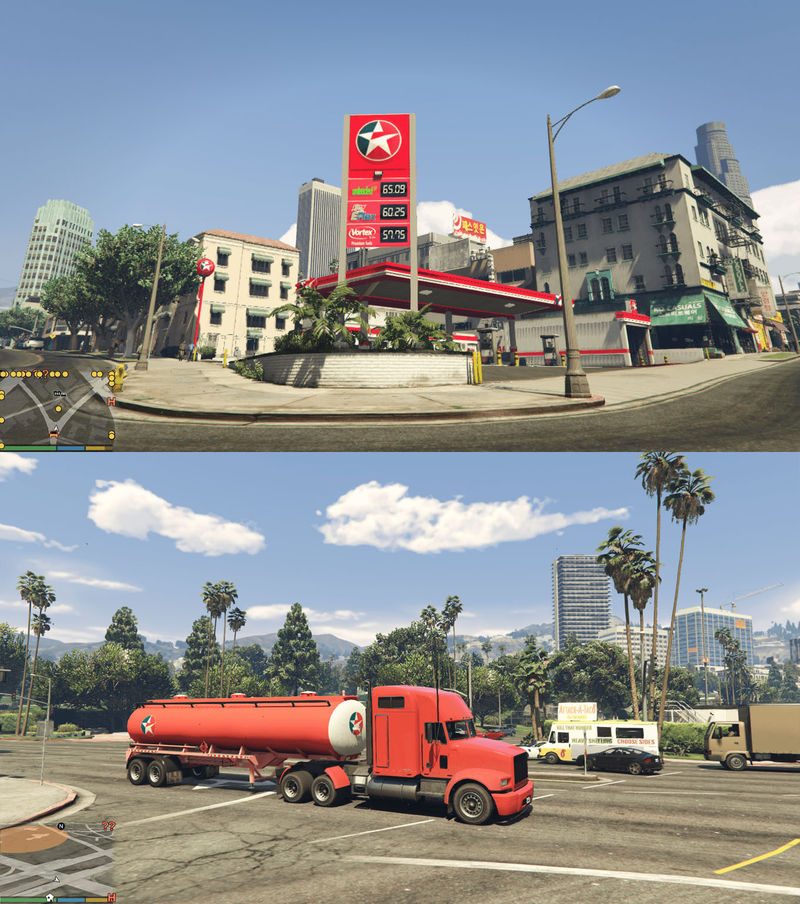
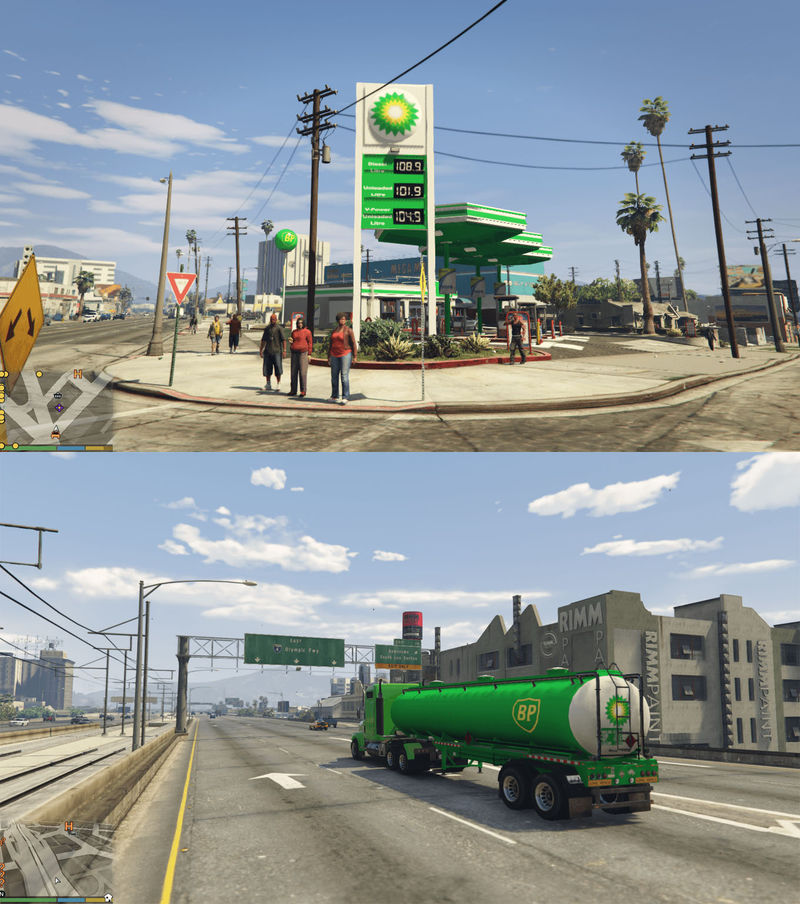
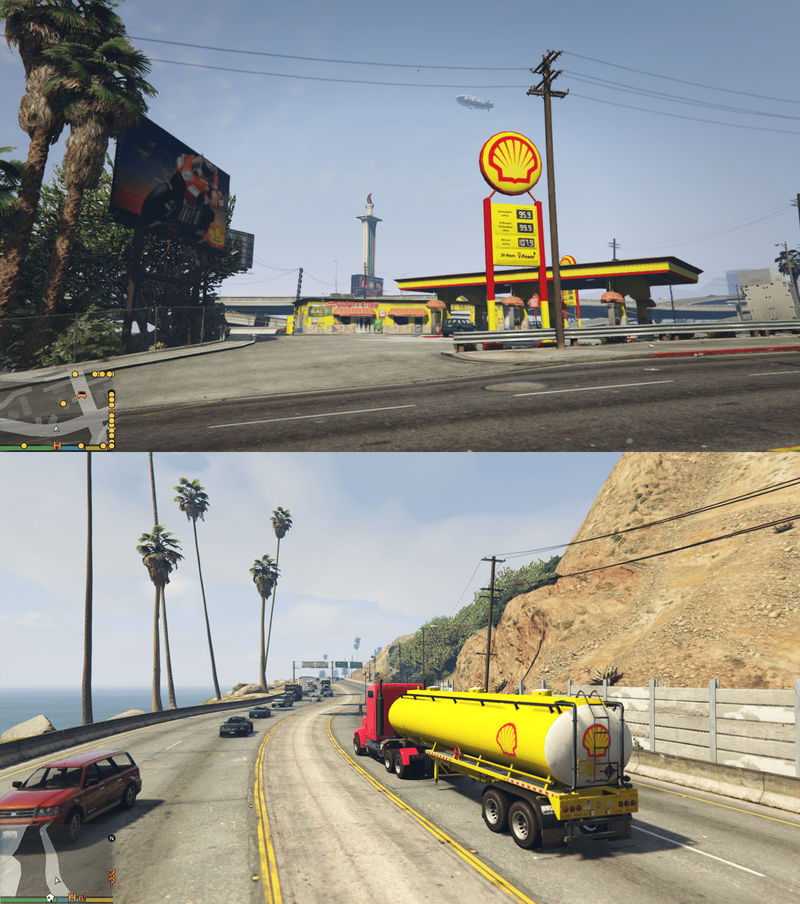
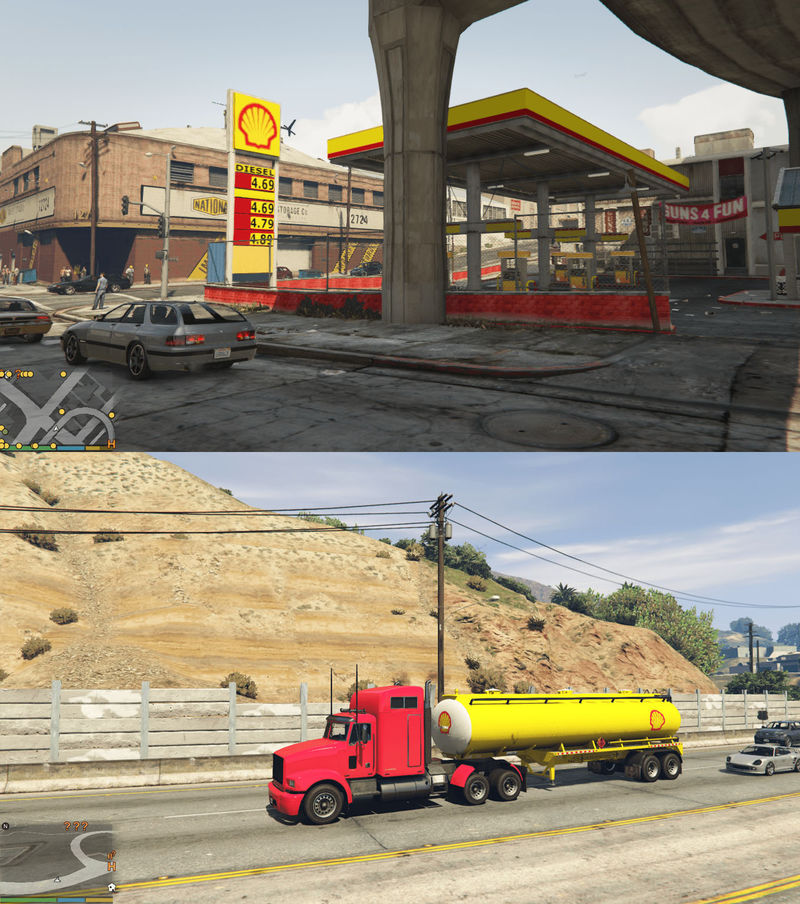
Shell, BP, Caltex Petrol Stations + Gas Tank Trailers V3.2 (FIXED)
Ratings:
Please sign in first.
Favorites:
Videos
No videos added yet.You need to be signed in to add videos to this mod.
Description
Hello, 3.2 version of the mod runs properly and there isn’t any interruptions or breakdowns in the game. You can download and install it safely. In addition, I included the original files of the game in this version so you can restore backups whenever you want. Have fun and good luck.
========[ FOR SINGLEPLAYER ONLY ]========
Modding in GTA Online is not allowed and could get you a ban. This mod is NOT for online use.
==============[ Requirements ]===============
OpenIV
GTA V
Backup x64j.rpf, x64k.rpf, x64l.rpf and dlc.rpf files before the installation.
============[ Install Instructions ]===========
1- Download the latest version of OpenIV program from openiv.com address.
2- After installing the program you will see a window for selecting game. Select GTA V Windows version.
3- Select GTA5.exe folder and click continue.
4- Now, you will see the files of the game. Click on Edit Mode button found on the upper part of the program.
5- Copy the files on the specified folders respectively. Open the folder where you will copy the files, drag and drop them.
id2_13_gas_02.ydr file found in Shell - 1 folder in --> x64j.rpf/levels/gta5/_citye/indust_02/id2_13.rpf
sc1_09_gasem.ydr file found in Shell - 2 folder in --> x64k.rpf/levels/gta5/_citye/scentral_01/sc1_09.rpf
kt1_11_gas.ydr file found in Caltex folder in --> x64l.rpf/levels/gta5/_cityw/koreatown_01/kt1_11.rpf
sc1_21_gas.ydr file found in BP folder in --> x64k.rpf/levels/gta5/_citye/scentral_01/sc1_21.rpf
tanker.ytd and tanker+hi.ytd files found in Gas Tank Trailer folder in --> update\x64\dlcpacks\patchday2ng\dlc.rpf\x64\levels\gta5\vehicles.rpf
Thats All! Enjoy and Have Fun :)
Thanks to:
Rockstar Games - Nice layouts of textures for easy editing.
OpenIV team - Brilliant mod tool!
Neodymium (on gtaforums.com) - Texture Toolkit program
Change Log
-3.2
Fixed corrupt download
Updated Readme
-3.1
Bug fixes
-3.0:
Added gas tank trailers
-2.1
Added back up files
-2.0:
Added Bp, Caltex petrol Stations
-1.0
--Initial Release
========[ FOR SINGLEPLAYER ONLY ]========
Modding in GTA Online is not allowed and could get you a ban. This mod is NOT for online use.
==============[ Requirements ]===============
OpenIV
GTA V
Backup x64j.rpf, x64k.rpf, x64l.rpf and dlc.rpf files before the installation.
============[ Install Instructions ]===========
1- Download the latest version of OpenIV program from openiv.com address.
2- After installing the program you will see a window for selecting game. Select GTA V Windows version.
3- Select GTA5.exe folder and click continue.
4- Now, you will see the files of the game. Click on Edit Mode button found on the upper part of the program.
5- Copy the files on the specified folders respectively. Open the folder where you will copy the files, drag and drop them.
id2_13_gas_02.ydr file found in Shell - 1 folder in --> x64j.rpf/levels/gta5/_citye/indust_02/id2_13.rpf
sc1_09_gasem.ydr file found in Shell - 2 folder in --> x64k.rpf/levels/gta5/_citye/scentral_01/sc1_09.rpf
kt1_11_gas.ydr file found in Caltex folder in --> x64l.rpf/levels/gta5/_cityw/koreatown_01/kt1_11.rpf
sc1_21_gas.ydr file found in BP folder in --> x64k.rpf/levels/gta5/_citye/scentral_01/sc1_21.rpf
tanker.ytd and tanker+hi.ytd files found in Gas Tank Trailer folder in --> update\x64\dlcpacks\patchday2ng\dlc.rpf\x64\levels\gta5\vehicles.rpf
Thats All! Enjoy and Have Fun :)
Thanks to:
Rockstar Games - Nice layouts of textures for easy editing.
OpenIV team - Brilliant mod tool!
Neodymium (on gtaforums.com) - Texture Toolkit program
Change Log
-3.2
Fixed corrupt download
Updated Readme
-3.1
Bug fixes
-3.0:
Added gas tank trailers
-2.1
Added back up files
-2.0:
Added Bp, Caltex petrol Stations
-1.0
--Initial Release
Comments
There are 5 comments posted yet.