GTA IV / Trainers
GTA IV Trainer Asi v2.0.0.0 vip
- fan script & Gta IV Community | uploaded by fan script
- 07/23/2026
- 3267 Downloads
Ratings:
Please sign in first.
Favorites:
Videos
No videos added yet.You need to be signed in to add videos to this mod.
Description
dzisiaj mam dla moich fanow
trainer Do gta IV na asi v2.0.0.0
Nowy Update rozmiar pliku asi 880.kb
zalety
stabilny testowany na versji gry 1.0.8.0
posiada zaawansowany silnik przewijania opcji i listy
ogulnie skrypt jest bardzo zaawansowany
dziala na klawiature
i na joypad
oczywiscie jesli masz x360ce_x86 niesamowity emulator padów
wtedy klikasz R1 + L1 i Menu sie otworzy i oczywiscie bedzie dzialalo tak jak na ps3
posiada plik ini a wlasciwie 3
konfiguracja menu
konfiguracja przechodnow
konfiguracja gnliniarzy
posiada mozliwosc wlaczenia pluginu no czyli skryptu w moim trainerze
ktury rozdaje przechodniom bron
wszystko jest zarzadzane w pliku ini
no czyli wlaczasz gre a przechodnie juz noszą bron lub walczą
istnieje tez mozliwosc udoskonalenia policji
trainer jest szybki zwinny i niesamowicie stabilny i gwarantujacy super zabawe
jest zbudowany na scripthook trainer jest jeszcze w procesie pisania kodu
lecz ma juz wielką ilosc opcji
ten projekt ma byc jeszcze potezniejszy niz xmc trainer commander na sco
ktury powstawal na konsole i pc
i ktury pobrano 214,368 osub
mod byl testowany na
windows 10
64 bit
oczywiscie trainer jest kompatybilny z innymi systemami
polecam vindows 7
i na versji gry gta 4 v1.0.8.0
uwaga mod wymaga
asi loader i scripthook
do gta 4
sam asi loader nie jest wstanie go uruchomic
potrzeba jeszcze scripthook
bo jest pisany na tej bibliotece sdk
uwaga trainer jest duzy nie uzywaj z innymi modami asi
trainer jest kompatybilny z modami sco ale nie takimi poteznymi jak muj trainer xmc commander na sco
bo jak wiesz gra ma limity rysowania
a od strony technicznej
projekt jest pisany w visual studio
i na
GTAIV Script Hook 0.4.0 SDK
baza Scripting.h jest udoskonalona przeze mnie w +150
funkcji native do gta 4
projekt jest pisany tylko na samych funkcjach Rage native tak jak na sco
skrypt sie fajnie skrypt trainera pisze sam
trainer ma zaawansowaną funkcje obslugi streamingu
czyli ladowania modeli itd
a czego mozesz sie spodziewać w nastepnych update
trainer bedzie jeszcze bardziej potezniejszy
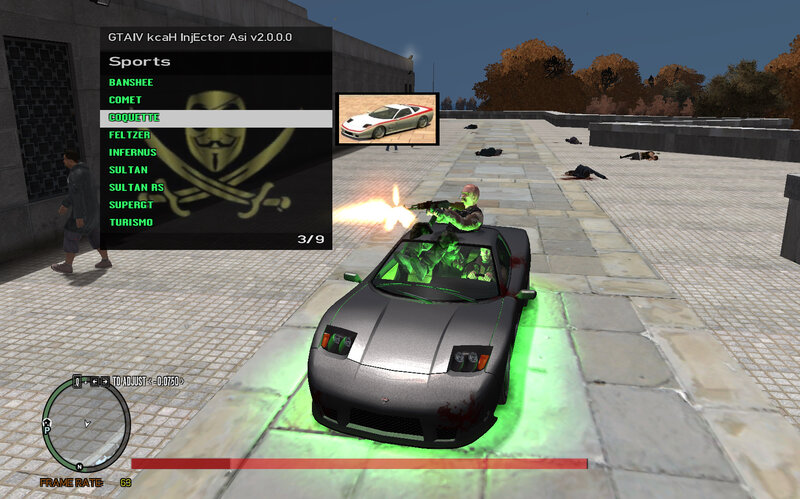
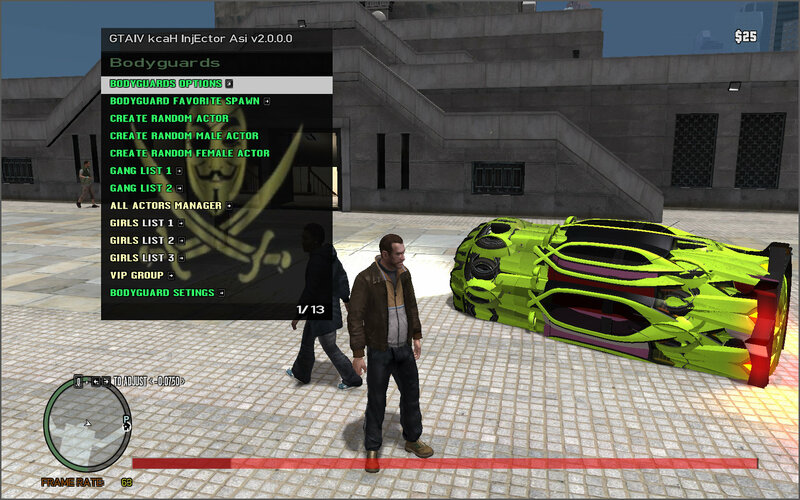
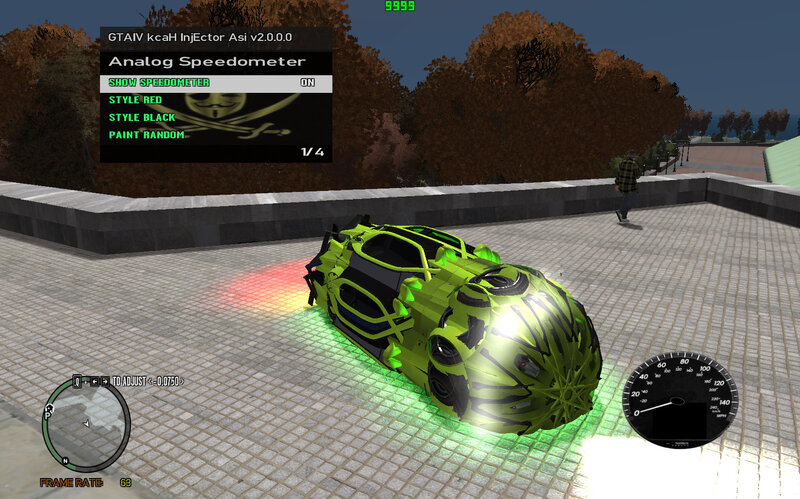
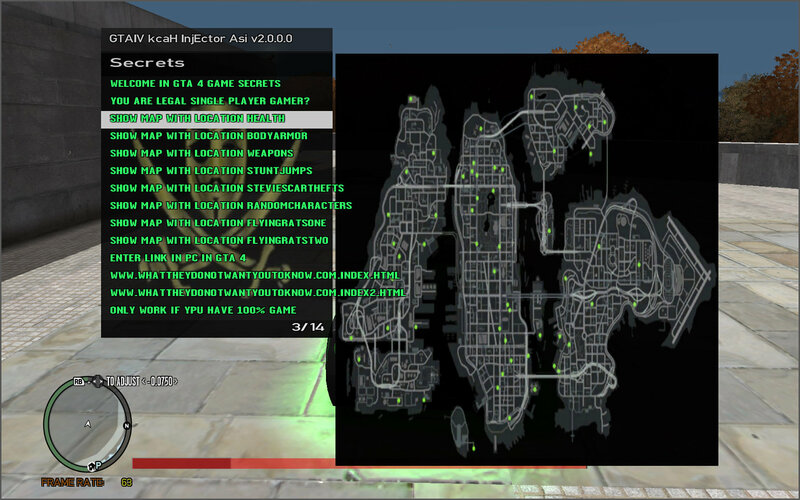
a czy wierz ze trainer juz potrafi wyswietlac
zdjecia pojazdow, broni ,aktorow i swoich tapet
i tworzyc pojazdy z gangami
PACZKA ZAWIERA
ASI LOADER I SCRIPTHOOK DZIALAJACY W MOJEJ GRZE
uwaga albo jedno albo drugie
powoduje to ze jak wejdziesz do menu gry podczas gry
to puzniej jak bedziesz chcial wyjsc gra sie zakonczy
sprawdzalem tego nie powoduje muj trainer
wiec jak chcesz sie pobawic moim trainerem
nie wlaz do menu gry podczas gry
no poprostu nie klikaj ESC
albo zaopatrz sie w inny asi loader i scripthook
a jesli chodzi o EFLC
jesli masz namiary na taką wersje scripthook
i w kturej ten trainer dziala
daj mi znac to zrobie aby trainer mugl korzystac
z modeli .i broni z dlc
bo na ten moment trainer zadziala
w eflc ale nie bedzie mugl korzystac z opcji na dlc EFLC
ja mam versje gry EFLC 1.1.3.0
----------------
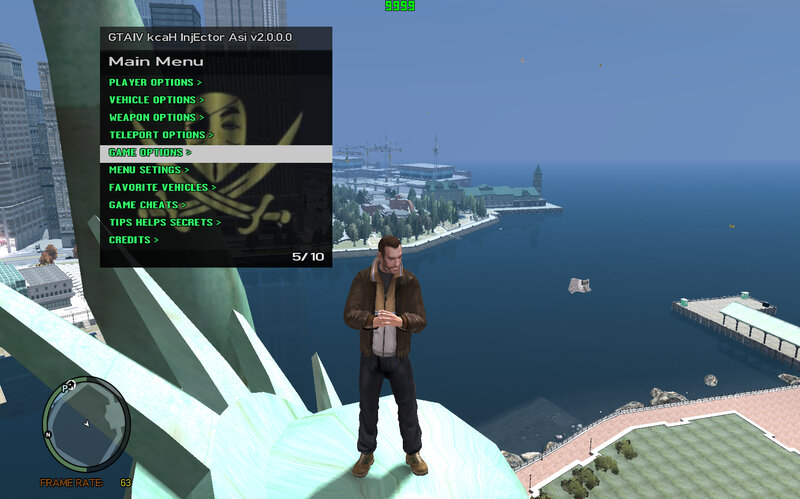
Today I have for my fans
GTA IV Trainer for ASi v2.0.0.0
New update, ASi file size: 880kb
Advantages
Stable, tested on game version 1.0.8.0
It has an advanced engine for scrolling through options and lists.
Overall, the script is very advanced.
It works on keyboards
And joypads.
Of course, if you have an x360ce_x86, it's an amazing gamepad emulator.
Then you click R1 + L1 and the menu will open, and of course, it will work just like on PS3.
It has an INI file, or rather, three.
Menu configuration
Pedestrian configuration
Gettings configuration
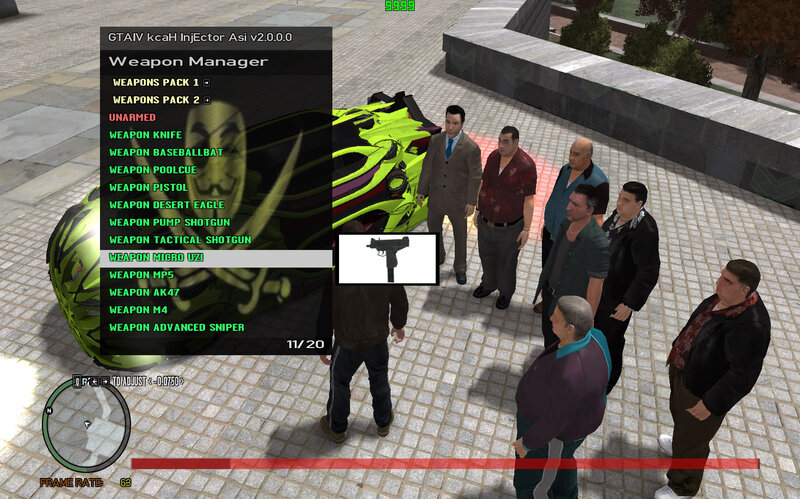
It has the ability to enable a plugin, a script in my trainer,
that distributes weapons to pedestrians.
Everything is managed in the INI file.
So, you start the game and Pedestrians are already carrying weapons or fighting.
There's also the option to upgrade the police.
The trainer is fast, agile, and incredibly stable, guaranteeing great fun.
It's built on a scripthook trainer. The coding is still in progress, but it already has a huge number of options.
This project aims to be even more powerful than the XMC Commander trainer for Scout,
which was developed for consoles and PC,
and which has been downloaded by 214,368 users.
The mod was tested on
Windows 10
64-bit.
Of course, the trainer is compatible with other systems.
I recommend Windows 7
and the game version GTA 4 v1.0.8.0.
Note: the mod requires
ASI Loader and Scripthook
for GTA 4.
ASI Loader alone won't be able to run it.
You also need a scripthook
because it's written on this SDK library.
Note: the trainer is large; do not use it. With other ASI mods, the trainer is compatible with SCO mods, but not as powerful as my XMC Commander trainer for SCO, because as you know, the game has drawing limits.
Technically, the project is being written in Visual Studio
and using GTAIV Script Hook 0.4.0 SDK. The Scripting.h database has been improved by me to +150 native functions for GTA 4. The project is being written solely using Rage native functions, just like for SCO.
The script is great; the trainer script writes itself.
The trainer has advanced streaming support, including model loading, etc.
What can you expect in the next updates?
The trainer will be even more powerful.
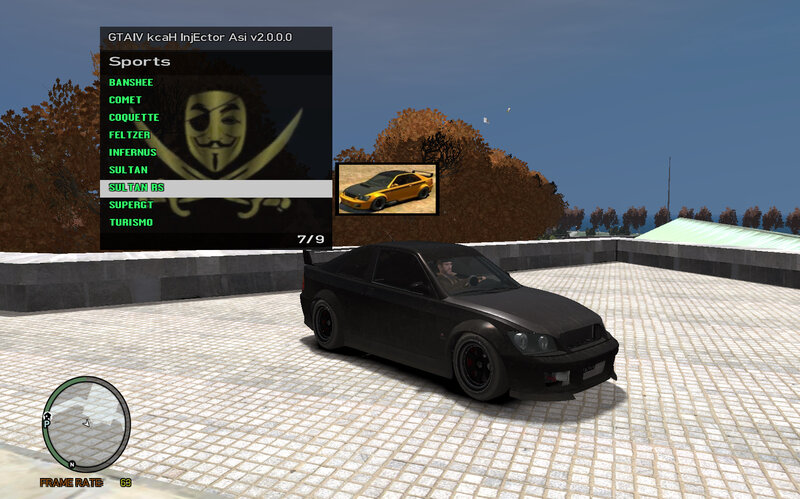
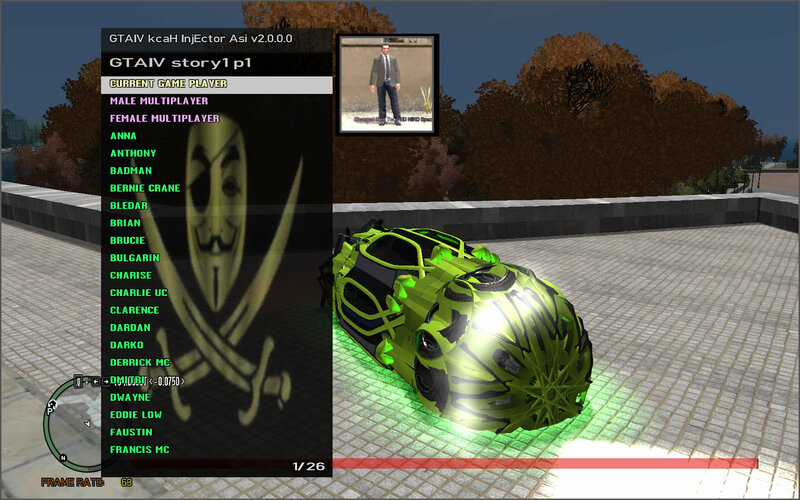
And do you believe that the trainer can already display
images of vehicles, weapons, actors, and your own wallpapers
and create gang vehicles.
THE PACKAGE INCLUDES
ASI LOADER AND SCRIPTHOOK WORKING IN MY GAME
Warning: Either one or the other
causes this: if you enter the game menu during gameplay,
then when you try to exit, the game will end.
I checked, my trainer doesn't cause this.
So if you want to play with my trainer,
don't enter the game menu during gameplay.
Just don't press ESC.
Or get a different ASI loader and scripthook.
And regarding EFLC,
if you have a link to a scripthook version
in which this trainer works, let me know, and I'll make it so the trainer can use
the models and weapons from the DLC.
Because at the moment, the trainer works
in EFLC, but it won't be able to use the EFLC DLC options.
I have EFLC version 1.1.3.0.
trainer Do gta IV na asi v2.0.0.0
Nowy Update rozmiar pliku asi 880.kb
zalety
stabilny testowany na versji gry 1.0.8.0
posiada zaawansowany silnik przewijania opcji i listy
ogulnie skrypt jest bardzo zaawansowany
dziala na klawiature
i na joypad
oczywiscie jesli masz x360ce_x86 niesamowity emulator padów
wtedy klikasz R1 + L1 i Menu sie otworzy i oczywiscie bedzie dzialalo tak jak na ps3
posiada plik ini a wlasciwie 3
konfiguracja menu
konfiguracja przechodnow
konfiguracja gnliniarzy
posiada mozliwosc wlaczenia pluginu no czyli skryptu w moim trainerze
ktury rozdaje przechodniom bron
wszystko jest zarzadzane w pliku ini
no czyli wlaczasz gre a przechodnie juz noszą bron lub walczą
istnieje tez mozliwosc udoskonalenia policji
trainer jest szybki zwinny i niesamowicie stabilny i gwarantujacy super zabawe
jest zbudowany na scripthook trainer jest jeszcze w procesie pisania kodu
lecz ma juz wielką ilosc opcji
ten projekt ma byc jeszcze potezniejszy niz xmc trainer commander na sco
ktury powstawal na konsole i pc
i ktury pobrano 214,368 osub
mod byl testowany na
windows 10
64 bit
oczywiscie trainer jest kompatybilny z innymi systemami
polecam vindows 7
i na versji gry gta 4 v1.0.8.0
uwaga mod wymaga
asi loader i scripthook
do gta 4
sam asi loader nie jest wstanie go uruchomic
potrzeba jeszcze scripthook
bo jest pisany na tej bibliotece sdk
uwaga trainer jest duzy nie uzywaj z innymi modami asi
trainer jest kompatybilny z modami sco ale nie takimi poteznymi jak muj trainer xmc commander na sco
bo jak wiesz gra ma limity rysowania
a od strony technicznej
projekt jest pisany w visual studio
i na
GTAIV Script Hook 0.4.0 SDK
baza Scripting.h jest udoskonalona przeze mnie w +150
funkcji native do gta 4
projekt jest pisany tylko na samych funkcjach Rage native tak jak na sco
skrypt sie fajnie skrypt trainera pisze sam
trainer ma zaawansowaną funkcje obslugi streamingu
czyli ladowania modeli itd
a czego mozesz sie spodziewać w nastepnych update
trainer bedzie jeszcze bardziej potezniejszy
a czy wierz ze trainer juz potrafi wyswietlac
zdjecia pojazdow, broni ,aktorow i swoich tapet
i tworzyc pojazdy z gangami
PACZKA ZAWIERA
ASI LOADER I SCRIPTHOOK DZIALAJACY W MOJEJ GRZE
uwaga albo jedno albo drugie
powoduje to ze jak wejdziesz do menu gry podczas gry
to puzniej jak bedziesz chcial wyjsc gra sie zakonczy
sprawdzalem tego nie powoduje muj trainer
wiec jak chcesz sie pobawic moim trainerem
nie wlaz do menu gry podczas gry
no poprostu nie klikaj ESC
albo zaopatrz sie w inny asi loader i scripthook
a jesli chodzi o EFLC
jesli masz namiary na taką wersje scripthook
i w kturej ten trainer dziala
daj mi znac to zrobie aby trainer mugl korzystac
z modeli .i broni z dlc
bo na ten moment trainer zadziala
w eflc ale nie bedzie mugl korzystac z opcji na dlc EFLC
ja mam versje gry EFLC 1.1.3.0
----------------
Today I have for my fans
GTA IV Trainer for ASi v2.0.0.0
New update, ASi file size: 880kb
Advantages
Stable, tested on game version 1.0.8.0
It has an advanced engine for scrolling through options and lists.
Overall, the script is very advanced.
It works on keyboards
And joypads.
Of course, if you have an x360ce_x86, it's an amazing gamepad emulator.
Then you click R1 + L1 and the menu will open, and of course, it will work just like on PS3.
It has an INI file, or rather, three.
Menu configuration
Pedestrian configuration
Gettings configuration
It has the ability to enable a plugin, a script in my trainer,
that distributes weapons to pedestrians.
Everything is managed in the INI file.
So, you start the game and Pedestrians are already carrying weapons or fighting.
There's also the option to upgrade the police.
The trainer is fast, agile, and incredibly stable, guaranteeing great fun.
It's built on a scripthook trainer. The coding is still in progress, but it already has a huge number of options.
This project aims to be even more powerful than the XMC Commander trainer for Scout,
which was developed for consoles and PC,
and which has been downloaded by 214,368 users.
The mod was tested on
Windows 10
64-bit.
Of course, the trainer is compatible with other systems.
I recommend Windows 7
and the game version GTA 4 v1.0.8.0.
Note: the mod requires
ASI Loader and Scripthook
for GTA 4.
ASI Loader alone won't be able to run it.
You also need a scripthook
because it's written on this SDK library.
Note: the trainer is large; do not use it. With other ASI mods, the trainer is compatible with SCO mods, but not as powerful as my XMC Commander trainer for SCO, because as you know, the game has drawing limits.
Technically, the project is being written in Visual Studio
and using GTAIV Script Hook 0.4.0 SDK. The Scripting.h database has been improved by me to +150 native functions for GTA 4. The project is being written solely using Rage native functions, just like for SCO.
The script is great; the trainer script writes itself.
The trainer has advanced streaming support, including model loading, etc.
What can you expect in the next updates?
The trainer will be even more powerful.
And do you believe that the trainer can already display
images of vehicles, weapons, actors, and your own wallpapers
and create gang vehicles.
THE PACKAGE INCLUDES
ASI LOADER AND SCRIPTHOOK WORKING IN MY GAME
Warning: Either one or the other
causes this: if you enter the game menu during gameplay,
then when you try to exit, the game will end.
I checked, my trainer doesn't cause this.
So if you want to play with my trainer,
don't enter the game menu during gameplay.
Just don't press ESC.
Or get a different ASI loader and scripthook.
And regarding EFLC,
if you have a link to a scripthook version
in which this trainer works, let me know, and I'll make it so the trainer can use
the models and weapons from the DLC.
Because at the moment, the trainer works
in EFLC, but it won't be able to use the EFLC DLC options.
I have EFLC version 1.1.3.0.
Comments
There are 16 comments posted yet.
09/03/2026 09:53
dzieki za 16,498 pobran wszystkich update tego trainera
trainer Do gta IV na asi v3.0.0.0 juz niedlugo
Nowy Update rozmiar pliku asi 1,500 mb trainera
trainer jest szybki zwinny i niesamowicie stabilny i gwarantujacy super zabawe
swietny ulatwiacz w misjach i udoskonalacz gry
ten projekt ma byc jeszcze potezniejszy niz xmc trainer commander na sco
ktury powstawal na konsole i pc a wlasciwie juz jest
jest to ulepszona kopia nastepcy
xmc commander V7,0,0,0 (Versji Prywatnej) po versji v6.2.2.0 na sco
ostatnio pisalem ze gre wyrzuca jak sie wejdzie do ustawien gry
i wyjdzie
okazalo sie ze to byl uszkodzony zapis gry
wiec asi loader i scripthook jest stabilny
a od strony technicznej
projekt jest pisany w visual studio 2026
i na
GTAIV Script Hook 0.4.0 SDK
baza Scripting.h jest udoskonalona przeze mnie w +212
funkcji native do gta 4
projekt jest pisany tylko na samych funkcjach Rage native tak jak na sco
nie uzywa golych adresow czy patern scaning
orginalne nazwy funkcji native w bazie scripthook są powiększone
prze ze mnie aby można bylo latwo konvertowac skrypty z versji C sco
skrypt sie fajnie pisze
skrypt trainera pisze sam
trainer ma zaawansowaną funkcje obslugi streamingu
czyli ladowania modeli itd
poniewaz kazda petla w skrypcie bez wyjscia by wywalila gre
dlatego pracuje na maszynie stanów
co nowego
bugi naprawione i braki w kodzie
dodany manager wszystkich animacji z panelem konfiguracji
dodany zapisywacz i czytnik koordynacji
dodano mozliwosc przewijania opcji kulkiem myszy
lub sterowania menu tylko za pomocą myszy jak aplikacje komputerowe
dodano wiecej opcji
mozliwosc ulepszenia grafiki juz na starcie gry
dodano czytnik arhiwum script.img w celu uruchamiania skryptow sco
dodano mp3 player na bibliotece MCI
jesli chodzi o mci to nawet mozna przewijac utwory
razem z mci wspulpracuje inna funkcja ktura moze sterowac glosnoscia systemu
po limicie volume w mci
jest mozliwosc odtworzyc klimatycznie i sekretne dzwieki gry
dodalem blokade resetu kominiarki
dodalem objekt editor z baza 27500 objektow
------------------
Thanks for the 16,498 downloads of all updates to this trainer.
Trainer for GTA IV on ASi v3.0.0.0 coming soon.
New update. ASi file size: 1,500 MB.
The trainer is fast, agile, and incredibly stable, guaranteeing great fun.
A great helper in missions and a game enhancer.
This project aims to be even more powerful than XMC Commander Trainer for Scout,
which was developed for consoles and PC, and is actually already available.
It is an improved copy of the successor
XMC Commander V7.0.0.0 (Private Version) after version v6.2.2.0 on Scout.
I recently wrote that the game crashes when entering the game settings
and exiting.
It turned out to be a corrupted save game.
So the ASi loader and scripthook are stable.
And from a technical perspective,
the project is being developed in Visual Studio 2026
and on
GTAIV Script Hook 0.4.0 SDK
The Scripting.h database has been improved by me in +212
Native functions for GTA 4
The project is based solely on Rage native functions, just like on SC.
It does not use bare addresses or pattern scanning.
The original names of native functions in the scripthook database are enlarged
by me so that scripts can be easily converted from C to SC.
The script is easy to write.
The trainer script is self-written.
The trainer has advanced streaming support,
i.e., model loading, etc.
Because any loop in the script without exit would crash the game,
it runs on a state machine.
What's new?
Fixed bugs and code deficiencies.
Added a manager for all animations with a configuration panel.
Added a coordinate recorder and reader.
Added the ability to scroll through options with a trackball. Mouse
or control menus only with the mouse, like in desktop applications.
More options added.
Possibility to improve graphics at game startup.
Added a script.img archive reader to run SCO scripts.
Added an MP3 player in the MCI library.
When it comes to MCI, you can even skip tracks.
Another function works with MCI that can control the system volume.
After the volume limit in MCI, it is possible to play atmospheric and secret game sounds.
Added a balaclava reset lock.
Added an object editor with a database of 27,500 objects.
Quote | Reply
dzieki za 16,498 pobran wszystkich update tego trainera
trainer Do gta IV na asi v3.0.0.0 juz niedlugo
Nowy Update rozmiar pliku asi 1,500 mb trainera
trainer jest szybki zwinny i niesamowicie stabilny i gwarantujacy super zabawe
swietny ulatwiacz w misjach i udoskonalacz gry
ten projekt ma byc jeszcze potezniejszy niz xmc trainer commander na sco
ktury powstawal na konsole i pc a wlasciwie juz jest
jest to ulepszona kopia nastepcy
xmc commander V7,0,0,0 (Versji Prywatnej) po versji v6.2.2.0 na sco
ostatnio pisalem ze gre wyrzuca jak sie wejdzie do ustawien gry
i wyjdzie
okazalo sie ze to byl uszkodzony zapis gry
wiec asi loader i scripthook jest stabilny
a od strony technicznej
projekt jest pisany w visual studio 2026
i na
GTAIV Script Hook 0.4.0 SDK
baza Scripting.h jest udoskonalona przeze mnie w +212
funkcji native do gta 4
projekt jest pisany tylko na samych funkcjach Rage native tak jak na sco
nie uzywa golych adresow czy patern scaning
orginalne nazwy funkcji native w bazie scripthook są powiększone
prze ze mnie aby można bylo latwo konvertowac skrypty z versji C sco
skrypt sie fajnie pisze
skrypt trainera pisze sam
trainer ma zaawansowaną funkcje obslugi streamingu
czyli ladowania modeli itd
poniewaz kazda petla w skrypcie bez wyjscia by wywalila gre
dlatego pracuje na maszynie stanów
co nowego
bugi naprawione i braki w kodzie
dodany manager wszystkich animacji z panelem konfiguracji
dodany zapisywacz i czytnik koordynacji
dodano mozliwosc przewijania opcji kulkiem myszy
lub sterowania menu tylko za pomocą myszy jak aplikacje komputerowe
dodano wiecej opcji
mozliwosc ulepszenia grafiki juz na starcie gry
dodano czytnik arhiwum script.img w celu uruchamiania skryptow sco
dodano mp3 player na bibliotece MCI
jesli chodzi o mci to nawet mozna przewijac utwory
razem z mci wspulpracuje inna funkcja ktura moze sterowac glosnoscia systemu
po limicie volume w mci
jest mozliwosc odtworzyc klimatycznie i sekretne dzwieki gry
dodalem blokade resetu kominiarki
dodalem objekt editor z baza 27500 objektow
------------------
Thanks for the 16,498 downloads of all updates to this trainer.
Trainer for GTA IV on ASi v3.0.0.0 coming soon.
New update. ASi file size: 1,500 MB.
The trainer is fast, agile, and incredibly stable, guaranteeing great fun.
A great helper in missions and a game enhancer.
This project aims to be even more powerful than XMC Commander Trainer for Scout,
which was developed for consoles and PC, and is actually already available.
It is an improved copy of the successor
XMC Commander V7.0.0.0 (Private Version) after version v6.2.2.0 on Scout.
I recently wrote that the game crashes when entering the game settings
and exiting.
It turned out to be a corrupted save game.
So the ASi loader and scripthook are stable.
And from a technical perspective,
the project is being developed in Visual Studio 2026
and on
GTAIV Script Hook 0.4.0 SDK
The Scripting.h database has been improved by me in +212
Native functions for GTA 4
The project is based solely on Rage native functions, just like on SC.
It does not use bare addresses or pattern scanning.
The original names of native functions in the scripthook database are enlarged
by me so that scripts can be easily converted from C to SC.
The script is easy to write.
The trainer script is self-written.
The trainer has advanced streaming support,
i.e., model loading, etc.
Because any loop in the script without exit would crash the game,
it runs on a state machine.
What's new?
Fixed bugs and code deficiencies.
Added a manager for all animations with a configuration panel.
Added a coordinate recorder and reader.
Added the ability to scroll through options with a trackball. Mouse
or control menus only with the mouse, like in desktop applications.
More options added.
Possibility to improve graphics at game startup.
Added a script.img archive reader to run SCO scripts.
Added an MP3 player in the MCI library.
When it comes to MCI, you can even skip tracks.
Another function works with MCI that can control the system volume.
After the volume limit in MCI, it is possible to play atmospheric and secret game sounds.
Added a balaclava reset lock.
Added an object editor with a database of 27,500 objects.
Quote | Reply
08/21/2026 12:03
Co dalej w tym projekcie? Rozmiar pliku trenera wynosi 1,430 MB. Dodałem skrypt czytnika archiwum img do uruchamiania skryptów sco. Dodałem odtwarzacz mp3, taki jak w moim trenerze GTA San Andreas. Dodałem więcej opcji.
what next in this project
trainer file size is 1,430 mb
i added script img arhive reader to run sco scripts
i added mp3 player like my gta san andreas trainer
i added more options
😎
Quote | Reply
Co dalej w tym projekcie? Rozmiar pliku trenera wynosi 1,430 MB. Dodałem skrypt czytnika archiwum img do uruchamiania skryptów sco. Dodałem odtwarzacz mp3, taki jak w moim trenerze GTA San Andreas. Dodałem więcej opcji.
what next in this project
trainer file size is 1,430 mb
i added script img arhive reader to run sco scripts
i added mp3 player like my gta san andreas trainer
i added more options
😎
Quote | Reply
07/30/2026 16:48
co nowego w tym projekcie od teraz trainer wazy 1,00 mb
co dodane
zapisywacz koordynacji do pliku, ini,manager wszystkich animacji z gta 4,a najwieksze ulepszenie to mozliwosc sterowania myszą jak na aplikacjach komputerowych ,i tez mozliwosc przewijania opcji kólkiem myszy i obsluga menu tylko za pomoca myszy od teraz trainer ma trzy opcje kontroli klawiatura,myszka ,i 3 to myszka wizualna no czyli pointer i zaznaczasz opcje w menu i klikasz myszką moze niedlugo nagram film
What's new in this project? The trainer now weighs 1.00 MB.
What's added?
A coordination saver to an INI file, a manager for all GTA 4 animations. The biggest improvement is the ability to control the mouse like in desktop applications, as well as the ability to scroll through options with the mouse wheel and operate the menu only with the mouse. The trainer now has three control options: keyboard, mouse, and 3rd is a visual mouse. That is, you use the pointer to select options in the menu and click with the mouse. Maybe I'll record a video soon.
Quote | Reply
co nowego w tym projekcie od teraz trainer wazy 1,00 mb
co dodane
zapisywacz koordynacji do pliku, ini,manager wszystkich animacji z gta 4,a najwieksze ulepszenie to mozliwosc sterowania myszą jak na aplikacjach komputerowych ,i tez mozliwosc przewijania opcji kólkiem myszy i obsluga menu tylko za pomoca myszy od teraz trainer ma trzy opcje kontroli klawiatura,myszka ,i 3 to myszka wizualna no czyli pointer i zaznaczasz opcje w menu i klikasz myszką moze niedlugo nagram film
What's new in this project? The trainer now weighs 1.00 MB.
What's added?
A coordination saver to an INI file, a manager for all GTA 4 animations. The biggest improvement is the ability to control the mouse like in desktop applications, as well as the ability to scroll through options with the mouse wheel and operate the menu only with the mouse. The trainer now has three control options: keyboard, mouse, and 3rd is a visual mouse. That is, you use the pointer to select options in the menu and click with the mouse. Maybe I'll record a video soon.
Quote | Reply
07/29/2026 10:24
co nowego w tym projekcie
plik trainera juz ma rozmiar 930.kb
mysle ze bede musial zrobic klucz bezpieczenstwa
na GetAsyncKeyState
do otwarcia menu
w razie jak by gluwny nie zadzialal
tymbardziej ze muj trainer uzywa
do otwierania menu opkodu native
IS_GAME_KEYBOARD_KEY_JUST_PRESSED
a wartosci id sa
mozesz manualnie albo automatycznie wpisac id w plik ini
jak chcesz automatycznie
wejdz w opcje menu setings
i wybierz opcje Menu: KeyPrees
wybierz key i kliknij space
a jak chcesz recznie tu masz tablice
What's new in this project?
The trainer file is already 930kb in size.
I think I'll have to create a security key.
Using GetAsyncKeyState
to open the menu.
In case the main one doesn't work.
Especially since my trainer uses
the native opcode
IS_GAME_KEYBOARD_KEY_JUST_PRESSED
to open the menu.
And the ID values are.
You can manually or automatically enter the ID in the INI file.
If you want to do it automatically,
go to the Settings menu option.
and select the Menu option: KeyPres.
Select the key and press space.
And if you want to do it manually, here's the table.
struct key_prees_pc key_prees_pc[] =
{
//slot|key id|key name
{ { 1, 1 },"KEY_ESC" },
{ { 2 ,2 },"KEY_1" },
{ { 3 ,3 },"KEY_2" },
{ { 4 ,4 },"KEY_3" },
{ { 5 ,5 },"KEY_4" },
{ { 6 ,6 },"KEY_5" },
{ { 7 ,7 },"KEY_6" },
{ { 8 ,8 },"KEY_7" },
{ { 9 ,9 },"KEY_8" },
{ { 10 ,10 },"KEY_9" },
{ { 11 ,11 },"KEY_0" },
{ { 12 ,12 },"KEY_MINUS" },
{ { 13 ,13 },"KEY_EQUAL" },
{ { 14 ,14 },"KEY_BACKSPACE" },
{ { 15 ,15 },"KEY_TAB" },
{ { 16 ,16 },"KEY_Q" },
{ { 17 ,17 },"KEY_W" },
{ { 18 ,18 },"KEY_E" },
{ { 19 ,19 },"KEY_R" },
{ { 20 ,20 },"KEY_T" },
{ { 21 ,21 },"KEY_Y" },
{ { 22 ,22 },"KEY_U" },
{ { 23 ,23 },"KEY_I" },
{ { 24 ,24 },"KEY_O" },
{ { 25 ,25 },"KEY_P" },
{ { 26 ,26 },"KEY_SQUARE_BRACKET_LEFT" },
{ { 27 ,27 },"KEY_SQUARE_BRACKET_RIGHT" },
{ { 28 ,28 },"KEY_ENTER" },
{ { 29 ,29 },"KEY_LEFT_CTRL" },
{ { 30 ,30 },"KEY_A" },
{ { 31 ,31 },"KEY_S" },
{ { 32 ,32 },"KEY_D" },
{ { 33 ,33 },"KEY_F" },
{ { 34 ,34 },"KEY_G" },
{ { 35 ,35 },"KEY_H" },
{ { 36 ,36 },"KEY_J" },
{ { 37 ,37 },"KEY_K" },
{ { 38 ,38 },"KEY_L" },
{ { 39 ,39 },"KEY_SEMI_COLON" },
{ { 40 ,40 },"KEY_APOSTROPHE" },
{ { 41 ,41 },"KEY_GRAVE" },
{ { 42 ,42 },"KEY_LEFT_SHIFT" },
{ { 43 ,43 },"KEY_BACKSLASH" },
{ { 44 ,44 },"KEY_Z" },
{ { 45 ,45 },"KEY_X" },
{ { 46 ,46 },"KEY_C" },
{ { 47 ,47 },"KEY_V" },
{ { 48 ,48 },"KEY_B" },
{ { 49 ,49 },"KEY_N" },
{ { 50 ,50 },"KEY_M" },
{ { 51 ,51 },"KEY_COMMA" },
{ { 52 ,52 },"KEY_PERIOD" },
{ { 53 ,53 },"KEY_FORWARDSLASH" },
{ { 54 ,54 },"KEY_RIGHT_SHIFT" },
{ { 55 ,55 },"KEY_ASTERISK" },
{ { 56 ,56 },"KEY_LEFT_ALT" },
{ { 57 ,57 },"KEY_SPACE" },
{ { 58 ,58 },"KEY_CAPS_LOCK" },
{ { 59 ,59 },"KEY_F1" },
{ { 60 ,60 },"KEY_F2" },
{ { 61 ,61 },"KEY_F3" },
{ { 62 ,62 },"KEY_F4" },
{ { 63 ,63 },"KEY_F5" },
{ { 64 ,64 },"KEY_F6" },
{ { 65 ,65 },"KEY_F7" },
{ { 66 ,66 },"KEY_F8" },
{ { 67 ,67 },"KEY_F9" },
{ { 68 ,68 },"KEY_F10" },
{ { 69 ,69 },"KEY_NUMLOCK" },
{ { 70 ,70 },"KEY_SCROLL_LOCK" },
{ { 71 ,71 },"KEY_NUMPAD_7" },
{ { 72 ,72 },"KEY_NUMPAD_8" },
{ { 73 ,73 },"KEY_NUMPAD_9" },
{ { 74 ,74 },"KEY_NUMPAD_MINUS" },
{ { 75 ,75 },"KEY_NUMPAD_4" },
{ { 76 ,76 },"KEY_NUMPAD_5" },
{ { 77 ,77 },"KEY_NUMPAD_6" },
{ { 78 ,78 },"KEY_NUMPAD_PLUS" },
{ { 79 ,79 },"KEY_NUMPAD_1" },
{ { 80 ,80 },"KEY_NUMPAD_2" },
{ { 81 ,81 },"KEY_NUMPAD_3" },
{ { 82 ,82 },"KEY_NUMPAD_0" },
{ { 83 ,83 },"KEY_NUMPAD_PERIOD" },
{ { 84 ,87 },"KEY_F11" },
{ { 85 ,88 },"KEY_F12" },
{ { 86 ,100 },"KEY_F13" },
{ { 87 ,101 },"KEY_F14" },
{ { 88 ,102 },"KEY_F15" },
{ { 89 ,119 },"KEY_PAUSE" },
{ { 90 ,112 },"KEY_KANA" },
{ { 91 ,121 },"KEY_CONVERT" },
{ { 92 ,123 },"KEY_NOCONVERT" },
{ { 93 ,125 },"KEY_YEN" },
{ { 94 ,141 },"KEY_NUMPAD_EQUAL" },
{ { 95 ,144 },"KEY_CIRCUMFLEX" },
{ { 96 ,145 },"KEY_AT" },
{ { 97 ,146 },"KEY_COLON" },
{ { 98 ,147 },"KEY_UNDERLINE" },
{ { 99 ,148 },"KEY_KANJI" },
{ { 100 ,149},"KEY_STOP" },
{ { 101 ,150},"KEY_AX" },
{ { 102 ,151},"KEY_UNLABELED" },
{ { 103 ,156},"KEY_NUMPAD_ENTER" },
{ { 104 ,157},"KEY_RIGHT_CRTL" },
{ { 105 ,179},"KEY_NUMPAD_COMMA" },
{ { 106 ,181},"KEY_NUMPAD_FORWARDSLASH" },
{ { 107 ,183},"KEY_SYSRQ" },
{ { 108 ,184},"KEY_RIGHT_ALT" },
{ { 109 ,199},"KEY_HOME" },
{ { 110,200 },"KEY_ARROW_UP" },
{ { 111,201 },"KEY_PAGEUP" },
{ { 112,203 },"KEY_ARROW_LEFT" },
{ { 113,205 },"KEY_ARROW_RIGHT" },
{ { 114,207 },"KEY_END" },
{ { 115,208 },"KEY_ARROW_DOWN" },
{ { 116,209 },"KEY_PAGEDOWN" },
{ { 117,210 },"KEY_INSERT" },
{ { 118,211 },"KEY_DELETE" },
{ { 119,219 },"KEY_LEFT_WINDOWS" },
{ { 120,220 },"KEY_RIGHT_WINDOWS" },
{ { 121,221 },"KEY_APPMENU" },
{ { 122,71 },"KEY_NUMPAD_HOME" },
{ { 123,72 },"KEY_NUMPAD_UP" },
{ { 124,73 },"KEY_NUMPAD_PAGEUP" },
{ { 125,75 },"KEY_NUMPAD_LEFT" },
{ { 126,77 },"KEY_NUMPAD_RIGHT" },
{ { 127,79 },"KEY_NUMPAD_END" },
{ { 128,80 },"KEY_NUMPAD_DOWN" },
{ { 129,81 },"KEY_NUMPAD_PAGEDOWN" },
{ { 130 ,82 },"KEY_NUMPAD_INSERT" },
{ { 131 ,83 },"KEY_NUMPAD_DELETE" },
{ { 132 ,183},"KEY_PRTSC" },
};
Quote | Reply
co nowego w tym projekcie
plik trainera juz ma rozmiar 930.kb
mysle ze bede musial zrobic klucz bezpieczenstwa
na GetAsyncKeyState
do otwarcia menu
w razie jak by gluwny nie zadzialal
tymbardziej ze muj trainer uzywa
do otwierania menu opkodu native
IS_GAME_KEYBOARD_KEY_JUST_PRESSED
a wartosci id sa
mozesz manualnie albo automatycznie wpisac id w plik ini
jak chcesz automatycznie
wejdz w opcje menu setings
i wybierz opcje Menu: KeyPrees
wybierz key i kliknij space
a jak chcesz recznie tu masz tablice
What's new in this project?
The trainer file is already 930kb in size.
I think I'll have to create a security key.
Using GetAsyncKeyState
to open the menu.
In case the main one doesn't work.
Especially since my trainer uses
the native opcode
IS_GAME_KEYBOARD_KEY_JUST_PRESSED
to open the menu.
And the ID values are.
You can manually or automatically enter the ID in the INI file.
If you want to do it automatically,
go to the Settings menu option.
and select the Menu option: KeyPres.
Select the key and press space.
And if you want to do it manually, here's the table.
struct key_prees_pc key_prees_pc[] =
{
//slot|key id|key name
{ { 1, 1 },"KEY_ESC" },
{ { 2 ,2 },"KEY_1" },
{ { 3 ,3 },"KEY_2" },
{ { 4 ,4 },"KEY_3" },
{ { 5 ,5 },"KEY_4" },
{ { 6 ,6 },"KEY_5" },
{ { 7 ,7 },"KEY_6" },
{ { 8 ,8 },"KEY_7" },
{ { 9 ,9 },"KEY_8" },
{ { 10 ,10 },"KEY_9" },
{ { 11 ,11 },"KEY_0" },
{ { 12 ,12 },"KEY_MINUS" },
{ { 13 ,13 },"KEY_EQUAL" },
{ { 14 ,14 },"KEY_BACKSPACE" },
{ { 15 ,15 },"KEY_TAB" },
{ { 16 ,16 },"KEY_Q" },
{ { 17 ,17 },"KEY_W" },
{ { 18 ,18 },"KEY_E" },
{ { 19 ,19 },"KEY_R" },
{ { 20 ,20 },"KEY_T" },
{ { 21 ,21 },"KEY_Y" },
{ { 22 ,22 },"KEY_U" },
{ { 23 ,23 },"KEY_I" },
{ { 24 ,24 },"KEY_O" },
{ { 25 ,25 },"KEY_P" },
{ { 26 ,26 },"KEY_SQUARE_BRACKET_LEFT" },
{ { 27 ,27 },"KEY_SQUARE_BRACKET_RIGHT" },
{ { 28 ,28 },"KEY_ENTER" },
{ { 29 ,29 },"KEY_LEFT_CTRL" },
{ { 30 ,30 },"KEY_A" },
{ { 31 ,31 },"KEY_S" },
{ { 32 ,32 },"KEY_D" },
{ { 33 ,33 },"KEY_F" },
{ { 34 ,34 },"KEY_G" },
{ { 35 ,35 },"KEY_H" },
{ { 36 ,36 },"KEY_J" },
{ { 37 ,37 },"KEY_K" },
{ { 38 ,38 },"KEY_L" },
{ { 39 ,39 },"KEY_SEMI_COLON" },
{ { 40 ,40 },"KEY_APOSTROPHE" },
{ { 41 ,41 },"KEY_GRAVE" },
{ { 42 ,42 },"KEY_LEFT_SHIFT" },
{ { 43 ,43 },"KEY_BACKSLASH" },
{ { 44 ,44 },"KEY_Z" },
{ { 45 ,45 },"KEY_X" },
{ { 46 ,46 },"KEY_C" },
{ { 47 ,47 },"KEY_V" },
{ { 48 ,48 },"KEY_B" },
{ { 49 ,49 },"KEY_N" },
{ { 50 ,50 },"KEY_M" },
{ { 51 ,51 },"KEY_COMMA" },
{ { 52 ,52 },"KEY_PERIOD" },
{ { 53 ,53 },"KEY_FORWARDSLASH" },
{ { 54 ,54 },"KEY_RIGHT_SHIFT" },
{ { 55 ,55 },"KEY_ASTERISK" },
{ { 56 ,56 },"KEY_LEFT_ALT" },
{ { 57 ,57 },"KEY_SPACE" },
{ { 58 ,58 },"KEY_CAPS_LOCK" },
{ { 59 ,59 },"KEY_F1" },
{ { 60 ,60 },"KEY_F2" },
{ { 61 ,61 },"KEY_F3" },
{ { 62 ,62 },"KEY_F4" },
{ { 63 ,63 },"KEY_F5" },
{ { 64 ,64 },"KEY_F6" },
{ { 65 ,65 },"KEY_F7" },
{ { 66 ,66 },"KEY_F8" },
{ { 67 ,67 },"KEY_F9" },
{ { 68 ,68 },"KEY_F10" },
{ { 69 ,69 },"KEY_NUMLOCK" },
{ { 70 ,70 },"KEY_SCROLL_LOCK" },
{ { 71 ,71 },"KEY_NUMPAD_7" },
{ { 72 ,72 },"KEY_NUMPAD_8" },
{ { 73 ,73 },"KEY_NUMPAD_9" },
{ { 74 ,74 },"KEY_NUMPAD_MINUS" },
{ { 75 ,75 },"KEY_NUMPAD_4" },
{ { 76 ,76 },"KEY_NUMPAD_5" },
{ { 77 ,77 },"KEY_NUMPAD_6" },
{ { 78 ,78 },"KEY_NUMPAD_PLUS" },
{ { 79 ,79 },"KEY_NUMPAD_1" },
{ { 80 ,80 },"KEY_NUMPAD_2" },
{ { 81 ,81 },"KEY_NUMPAD_3" },
{ { 82 ,82 },"KEY_NUMPAD_0" },
{ { 83 ,83 },"KEY_NUMPAD_PERIOD" },
{ { 84 ,87 },"KEY_F11" },
{ { 85 ,88 },"KEY_F12" },
{ { 86 ,100 },"KEY_F13" },
{ { 87 ,101 },"KEY_F14" },
{ { 88 ,102 },"KEY_F15" },
{ { 89 ,119 },"KEY_PAUSE" },
{ { 90 ,112 },"KEY_KANA" },
{ { 91 ,121 },"KEY_CONVERT" },
{ { 92 ,123 },"KEY_NOCONVERT" },
{ { 93 ,125 },"KEY_YEN" },
{ { 94 ,141 },"KEY_NUMPAD_EQUAL" },
{ { 95 ,144 },"KEY_CIRCUMFLEX" },
{ { 96 ,145 },"KEY_AT" },
{ { 97 ,146 },"KEY_COLON" },
{ { 98 ,147 },"KEY_UNDERLINE" },
{ { 99 ,148 },"KEY_KANJI" },
{ { 100 ,149},"KEY_STOP" },
{ { 101 ,150},"KEY_AX" },
{ { 102 ,151},"KEY_UNLABELED" },
{ { 103 ,156},"KEY_NUMPAD_ENTER" },
{ { 104 ,157},"KEY_RIGHT_CRTL" },
{ { 105 ,179},"KEY_NUMPAD_COMMA" },
{ { 106 ,181},"KEY_NUMPAD_FORWARDSLASH" },
{ { 107 ,183},"KEY_SYSRQ" },
{ { 108 ,184},"KEY_RIGHT_ALT" },
{ { 109 ,199},"KEY_HOME" },
{ { 110,200 },"KEY_ARROW_UP" },
{ { 111,201 },"KEY_PAGEUP" },
{ { 112,203 },"KEY_ARROW_LEFT" },
{ { 113,205 },"KEY_ARROW_RIGHT" },
{ { 114,207 },"KEY_END" },
{ { 115,208 },"KEY_ARROW_DOWN" },
{ { 116,209 },"KEY_PAGEDOWN" },
{ { 117,210 },"KEY_INSERT" },
{ { 118,211 },"KEY_DELETE" },
{ { 119,219 },"KEY_LEFT_WINDOWS" },
{ { 120,220 },"KEY_RIGHT_WINDOWS" },
{ { 121,221 },"KEY_APPMENU" },
{ { 122,71 },"KEY_NUMPAD_HOME" },
{ { 123,72 },"KEY_NUMPAD_UP" },
{ { 124,73 },"KEY_NUMPAD_PAGEUP" },
{ { 125,75 },"KEY_NUMPAD_LEFT" },
{ { 126,77 },"KEY_NUMPAD_RIGHT" },
{ { 127,79 },"KEY_NUMPAD_END" },
{ { 128,80 },"KEY_NUMPAD_DOWN" },
{ { 129,81 },"KEY_NUMPAD_PAGEDOWN" },
{ { 130 ,82 },"KEY_NUMPAD_INSERT" },
{ { 131 ,83 },"KEY_NUMPAD_DELETE" },
{ { 132 ,183},"KEY_PRTSC" },
};
Quote | Reply
07/29/2026 10:05
jak kontrolowac to menu
otwierasz klawiszem 7 to zalezy jaki id masz wpisany w plik ini menu_config.ini
wybierasz opcje klawiszem space
zmienisz wartosci klawiszem strzalek < i >
chodzisz po opcjach klawiszem strzalki gura i duł
wracasz na poprzedni level lub zamykasz menu klawiszem
backspace
How to control this menu:
You open it with the 7 key, depending on the ID you entered in the menu_config.ini file.
You select options with the spacebar.
You change values with the < or > arrow keys.
You navigate through the options with the up and down arrow keys.
You return to the previous level or close the menu with the backspace key.
Quote | Reply
jak kontrolowac to menu
otwierasz klawiszem 7 to zalezy jaki id masz wpisany w plik ini menu_config.ini
wybierasz opcje klawiszem space
zmienisz wartosci klawiszem strzalek < i >
chodzisz po opcjach klawiszem strzalki gura i duł
wracasz na poprzedni level lub zamykasz menu klawiszem
backspace
How to control this menu:
You open it with the 7 key, depending on the ID you entered in the menu_config.ini file.
You select options with the spacebar.
You change values with the < or > arrow keys.
You navigate through the options with the up and down arrow keys.
You return to the previous level or close the menu with the backspace key.
Quote | Reply
07/29/2026 09:56
Quote | Reply
return menu level or close menu is Backspace ,thanks for comment 🙂Quote: techtim79
I can get the menu to open with keyboard number 7 key, but I cannot get it to close or to go back to previous menu after going into a menu. So 7 key to open arrow keys to go up or down or to adjust a setting spacebar to choose a setting or menu.
Quote | Reply

07/28/2026 20:50
co nowego w tym super projekcie
plik trainera juz ma rozmiar 915.kb
co planuje jeszcze wdrożyć
1
zapisywacz koordynacji, do pliku ini
i czytnik zapisanych koordynacji aby potem podzas gry przeteleportowac
sie do ulubionych miejsc
2
manager wszystkich animacji z gta 4
3
planuje tez zrobic aby mozna bylo wybrac kobiety
jako ochroniarze na motorze albo łodzi albo helikopterze lub samochodzie
w sekcji vip grup juz jest w standardzie ze mogą mieć samochód
no a ja to planuje ulepszyc
tez trainer bedzie bardziej zrozumialy dla uzytkownikow
kturzy uzywaja klawiatury
na ten moment trainer mam dodanych wiecej opcji
i ma troche bugów naprawionych
What's new in this great project?
The trainer file is already 915kb in size.
What else do I plan to implement?
1. A coordination saver for the .ini file and a saved coordination reader so I can teleport to my favorite locations during gameplay.
2. A manager for all GTA 4 animations.
3.
I also plan to make it possible to select women as bodyguards on a motorcycle, boat, helicopter, or car.
In the VIP group section, it's already standard that they can have a car.
And I plan to improve that.
The trainer will also be more understandable for users who use a keyboard.
Currently, I've added more options to the trainer.
And some bugs have been fixed.
🤯🤯😎
Quote | Reply
co nowego w tym super projekcie
plik trainera juz ma rozmiar 915.kb
co planuje jeszcze wdrożyć
1
zapisywacz koordynacji, do pliku ini
i czytnik zapisanych koordynacji aby potem podzas gry przeteleportowac
sie do ulubionych miejsc
2
manager wszystkich animacji z gta 4
3
planuje tez zrobic aby mozna bylo wybrac kobiety
jako ochroniarze na motorze albo łodzi albo helikopterze lub samochodzie
w sekcji vip grup juz jest w standardzie ze mogą mieć samochód
no a ja to planuje ulepszyc
tez trainer bedzie bardziej zrozumialy dla uzytkownikow
kturzy uzywaja klawiatury
na ten moment trainer mam dodanych wiecej opcji
i ma troche bugów naprawionych
What's new in this great project?
The trainer file is already 915kb in size.
What else do I plan to implement?
1. A coordination saver for the .ini file and a saved coordination reader so I can teleport to my favorite locations during gameplay.
2. A manager for all GTA 4 animations.
3.
I also plan to make it possible to select women as bodyguards on a motorcycle, boat, helicopter, or car.
In the VIP group section, it's already standard that they can have a car.
And I plan to improve that.
The trainer will also be more understandable for users who use a keyboard.
Currently, I've added more options to the trainer.
And some bugs have been fixed.
🤯🤯😎
Quote | Reply
07/25/2026 13:01
jak cos nie wiesz to pytaj
zadawanie pytan jest priorytetem
tymbardziej ze trainer ma mase opcji
a do uzywania mod menu polecam program
x360ce i pc joypad ,
postaram sie jeszcze bardziej opisac w skrypcie co naciskac w nastepnym update
If you don't know something, ask.
Asking questions is a priority,
especially since the trainer has tons of options,
and for using the mod menu, I recommend the Xbox 360 CE program and a PC joypad.
I'll try to describe in more detail what to press in the script in the next update.
Quote | Reply
jak cos nie wiesz to pytaj
zadawanie pytan jest priorytetem
tymbardziej ze trainer ma mase opcji
a do uzywania mod menu polecam program
x360ce i pc joypad ,
postaram sie jeszcze bardziej opisac w skrypcie co naciskac w nastepnym update
If you don't know something, ask.
Asking questions is a priority,
especially since the trainer has tons of options,
and for using the mod menu, I recommend the Xbox 360 CE program and a PC joypad.
I'll try to describe in more detail what to press in the script in the next update.
Quote | Reply
07/23/2026 22:39
jak zainstalowac ten extremalny hack
to proste wrzuc wszystkie pliki z folderu
script_injector do folderu gry
nastepnie otwurz folder Mod z paczki
i wrzuc wszystkie pliki do folderu gry
i tutaj bardzo wazne
otwurz plik
menu_config.ini
i wpisz
pod sekcje
[Settings]
MenuKey=8
8
jak uruchomisz gre
nacisnij na klawiaturze 7
a mod menu sie otworzy
polecane systemy
windows 7
polecana karta graficzna
2 albo 4 gb
uwaga na widows 10 gta 4 jest niestabilne
How to install this extreme hack
It's simple. Drop all the files from the script_injector folder into the game folder.
Then open the Mod folder from the package.
And drop all the files into the game folder.
And this is very important.
Open the
menu_config.ini file.
and enter
under the section:
[Settings]
MenuKey=8
8
When you start the game,
press 7 on your keyboard
and the mod menu will open.
Recommended systems:
Windows 7
Recommended graphics card:
2 or 4 GB
Beware of Windows 10. GTA 4 is unstable.


Quote | Reply
jak zainstalowac ten extremalny hack
to proste wrzuc wszystkie pliki z folderu
script_injector do folderu gry
nastepnie otwurz folder Mod z paczki
i wrzuc wszystkie pliki do folderu gry
i tutaj bardzo wazne
otwurz plik
menu_config.ini
i wpisz
pod sekcje
[Settings]
MenuKey=8
8
jak uruchomisz gre
nacisnij na klawiaturze 7
a mod menu sie otworzy
polecane systemy
windows 7
polecana karta graficzna
2 albo 4 gb
uwaga na widows 10 gta 4 jest niestabilne
How to install this extreme hack
It's simple. Drop all the files from the script_injector folder into the game folder.
Then open the Mod folder from the package.
And drop all the files into the game folder.
And this is very important.
Open the
menu_config.ini file.
and enter
under the section:
[Settings]
MenuKey=8
8
When you start the game,
press 7 on your keyboard
and the mod menu will open.
Recommended systems:
Windows 7
Recommended graphics card:
2 or 4 GB
Beware of Windows 10. GTA 4 is unstable.
Quote | Reply